June 23, 2025

When checking the storage settings on my Mac what is “other” and “system data”?

Storage settings on the Mac can give you an idea of what is taking up space on your Mac however it’s not a full detail.

When checking the storage settings on my Mac what is "other" and "system data"?

Storage Settings on a Mac is a section in macOS where you can see how your disk space is being used and manage it effectively. It breaks down your storage by categories (like Apps, Documents, System, Photos, etc.) and gives you recommendations to optimize space.
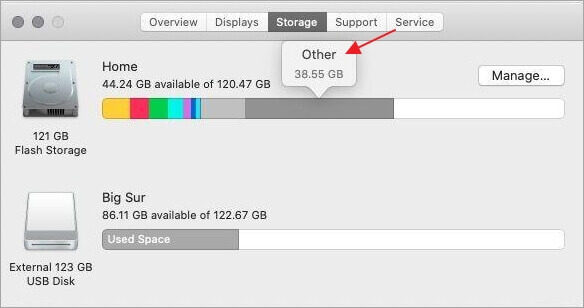

TABLE OF CONTENTS


How do I access storage settings on my Mac?

How to Access Storage Settings

On macOS Ventura, Sonoma, or Sequoia:

  1. Go to System Settings (click  Apple menu > System Settings).
  2. Click General in the sidebar.
  3. Click Storage on the right.

On macOS Monterey or earlier:

  1. Click the  Apple menu.
  2. Choose About This Mac.
  3. Click the Storage tab.

What is “other” in the profile in my storage settings?

other storage on mac

On a Mac, in Storage settings (found under  > About This Mac > Storage, or in System Settings > General > Storage in newer macOS versions), the category labeled “Other” (or sometimes just a gray area without a label in newer versions) typically includes files that don’t fall into the predefined categories like Apps, Documents, Photos, Music, or System.

“Other” storage can include:

  • System and temporary files not listed under “System”
  • Cache files (e.g., browser cache, app caches)
  • App support files
  • Disk images and archives (.dmg, .zip, .iso files)
  • Fonts, extensions, and plugins
  • Old iOS backups (if stored locally)
  • Virtual machine files (e.g., from Parallels or VMware)
  • Log files and diagnostic reports
  • Files stored in hidden folders (like /private or /var)

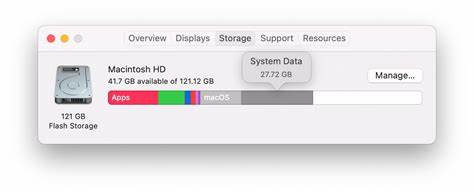
What is “system data” in the profile in my storage settings?

OIP.cJ PNvXiLJrp WW7jSZfKgHaDC

📦 What’s Included in System Data:

  1. macOS System Files
    • The core components of the operating system itself.
  2. Temporary and Cache Files
    • App and system caches
    • Browser caches
    • Log files
    • Spotlight indexing files
    • Virtual memory (swap files)
  3. Application Support Files
    • Data required for macOS and apps to function properly (e.g., GarageBand sound libraries, Logic Pro resources).
  4. Time Machine Local Snapshots
    • Temporary backups stored on your internal drive (if Time Machine is enabled).
  5. System Extensions and Drivers
    • Kernel extensions, fonts, and low-level system libraries.
  6. Old iOS Device Backups
    • If you’ve ever backed up an iPhone or iPad to your Mac.
  7. Disk Images and Archives
    • Mounted or downloaded .dmg, .pkg, .zip, and .iso files that haven’t been deleted.
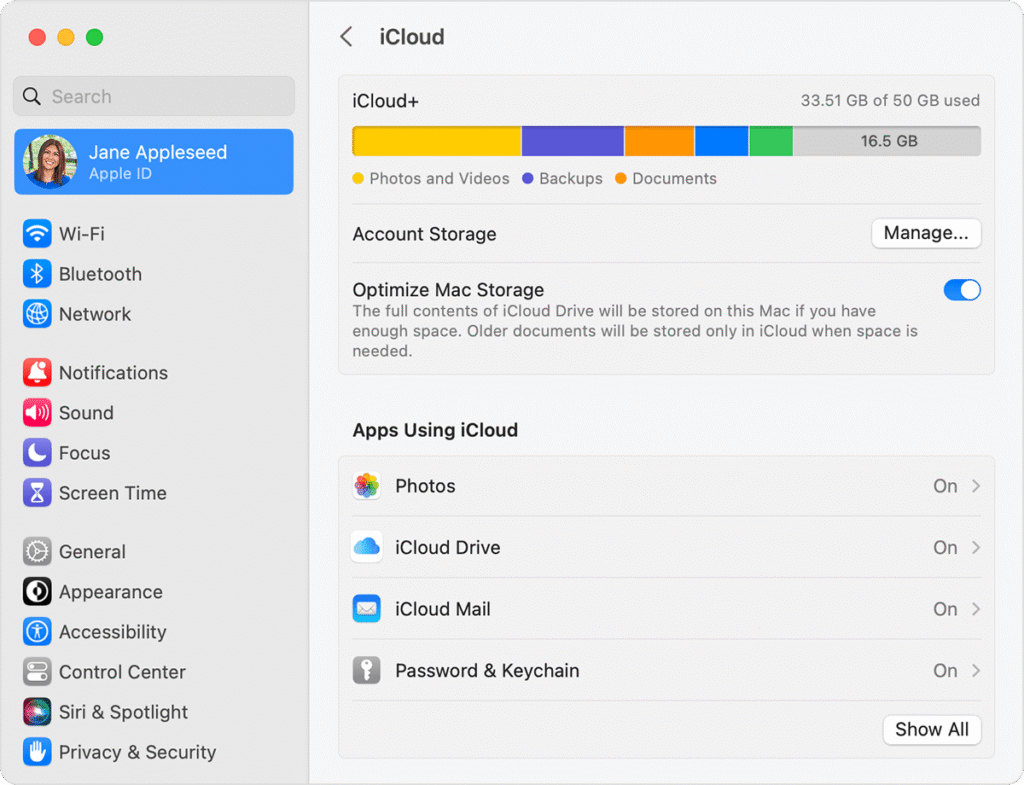
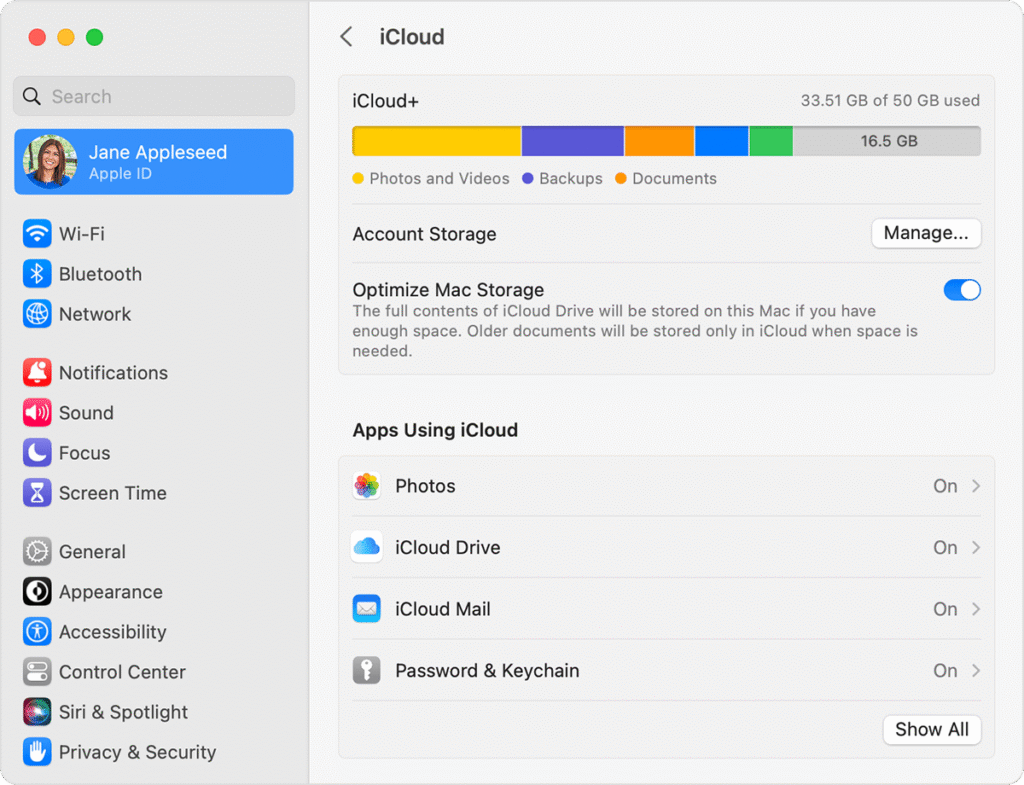
Can my iCloud data affect the amount of data in Storage settings, what does it show as?

macos ventura system settings apple id icloud plus manage 1

Yes, your iCloud data can affect what shows up in Storage settings on a Mac — both in terms of what’s stored locally and how it’s categorized. Here’s how it works:

📁 How iCloud Data Affects Storage Settings

1. iCloud Files That Are Stored Locally

If you’re using iCloud Drive or Desktop & Documents syncing, files you recently accessed (or marked to “Keep Downloaded”) are stored on your Mac, and count toward local storage. These files appear under:

  • Documents – if they’re regular files synced from iCloud Drive
  • iCloud Drive – in some versions of macOS (especially older ones)
  • System Data – if they’re cached or temporary iCloud files
  • Other Users – if files are associated with another Apple ID/user account

2. Files Stored Only in iCloud

Files that are only in iCloud and not downloaded to your Mac do not count toward your Mac’s local storage, but you’ll still see them in Finder with a download icon (cloud with a downward arrow).

📊 What Category iCloud Data Shows As

iCloud Item TypeHow It Appears in Storage Settings
iCloud Drive (downloaded)Documents or iCloud Drive (depends on macOS)
Desktop & Documents foldersDocuments
iCloud Photos (downloaded)Photos
Mail in iCloud (downloaded)Mail
iCloud Music LibraryMusic or Apple Music
Cached iCloud DataSystem Data

🧹 Ways to Control Local iCloud Storage Use

  • Enable “Optimize Mac Storage”:
    Go to System Settings > Apple ID > iCloud > iCloud Drive → Turn on “Optimize Mac Storage”.
    This keeps older iCloud files in the cloud and removes local copies automatically when space is needed.
  • Manually remove downloads:
    In Finder, right-click a downloaded iCloud file and choose Remove Download. This deletes the local copy but keeps it in iCloud.

How do I control “System Data” and “Other” on my Mac?

tuneup hero

A Denver Mac Repair Tune-Up offers a professional and effective way to regain control over the mysterious “Other” and “System Data” categories in your Mac’s storage. Over time, these categories can silently balloon with leftover caches, logs, hidden system files, failed updates, and temporary data from apps — none of which are easily visible or accessible to the average user. Our tune-up service digs deeper than what’s possible with built-in tools or simple apps, clearing out unnecessary files and reclaiming precious storage space without risking your data or damaging your system.

During a tune-up, our technicians perform a comprehensive cleanup that includes removing outdated cache files, old system logs, local Time Machine snapshots, and remnants of uninstalled apps. We also identify large, hidden app support files and isolate iCloud-related clutter that may be unnecessarily stored locally. These optimizations help reduce the size of the “Other” and “System Data” categories significantly — often freeing up tens of gigabytes of space that can make a noticeable difference, especially on Macs with smaller drives.

Beyond reclaiming storage, a tune-up can lead to a faster, more responsive Mac. When your system isn’t bogged down by excess background data and disk fragmentation, apps launch quicker, files open faster, and overall performance improves. Whether you’re trying to speed up an older machine or just want your Mac running like new, a Denver Mac Repair tune-up is a smart, affordable way to optimize your system and get the most out of your storage.

Our Reviews

Posted on Google Google
Austin Rakowski profile picture
Austin Rakowski
22 days ago
Google star 1Google star 2Google star 3Google star 4Google star 5Trustindex verifies that the original source of the review is Google.
I needed to get my cracked displayed repaired on my MacBook. This was my experience with the Apple Store in Cherry Creek: - First go to the store for a diagnostic appointment where they confirmed that my screen was indeed cracked - They order the part and set up an appointment for me to come drop my computer off 5 days later. - Despite having an appointment, I waited over an hour and had to leave due to restraints. They then released the part and I had to start the process over again with a new diagnostic appointment (as if my screen wasn't still broken) With Denver Mac Repair: - Dropped it off at 5:30PM Friday afternoon - Was ready for pickup Monday at 3pm Not to mention they were ~$70 cheaper than Apple. These guys are legends, support local and go here.
Posted on Google Google
Yannek Smith profile picture
Yannek Smith
33 days ago
Google star 1Google star 2Google star 3Google star 4Google star 5Trustindex verifies that the original source of the review is Google.
Great professional care. They provided a lot of attention and care to help us resolve a persistent computer issue (security breach / possible hacking on personal computer). Thank you for going above and beyond and helping us feel safe using home laptop again.
Posted on Google Google
jimmy parkour profile picture
jimmy parkour
33 days ago
Google star 1Google star 2Google star 3Google star 4Google star 5Trustindex verifies that the original source of the review is Google.
Fantastic service at a great price. Guys are super nice and professional!!
Posted on Google Google
Dariel Rodriguez Arias profile picture
Dariel Rodriguez Arias
34 days ago
Google star 1Google star 2Google star 3Google star 4Google star 5Trustindex verifies that the original source of the review is Google.
Truly Exceptional Service After more than six years, I finally got my MacBook Pro back to life—and I couldn’t be more grateful to Denver Mac Repair. The staff was absolutely awesome: knowledgeable, skilled, professional, honest, and genuinely caring. In a world where people with true expertise and integrity can feel increasingly rare, these guys reminded me that they still exist. They didn’t just repair my computer—they woke it back up after six years and brought back something I had almost given up on. That meant a lot to me. Thank you, Denver Mac Repair, for your incredible work and for treating me with such honesty and professionalism. You guys are truly the best, and I highly recommend you to anyone who needs Mac repair!
Posted on Google Google
Carl IPsen profile picture
Carl IPsen
35 days ago
Google star 1Google star 2Google star 3Google star 4Google star 5Trustindex verifies that the original source of the review is Google.
Super helpful and pleasant!
Posted on Google Google
Eric Rysner profile picture
Eric Rysner
39 days ago
Google star 1Google star 2Google star 3Google star 4Google star 5Trustindex verifies that the original source of the review is Google.
All I can say is wow! My son accidentally dropped his iPhone in a river while on a backpacking trip. Turns out his iCloud backup had not been set up properly, and three years of pictures had been potentially lost. The guys at Denver Mac Repair got everything up and running and transferred to a new phone. These guys are awesome, knowledgeable, professional, and their pricing was very fair. Thank you!
Posted on Google Google
Paige Reilly profile picture
Paige Reilly
41 days ago
Google star 1Google star 2Google star 3Google star 4Google star 5Trustindex verifies that the original source of the review is Google.
Incredible neighborhood computer store. My dad worked with one company for my whole childhood, and i spent a LOT of time with him have only found big box stores since, so i've been looking for a space that is as supportive as that business from my childhood....and I found it here! Great technicians, who share information freely and without arrogance, great prices and better location. Love this store
Posted on Google Google
Tom Masterson profile picture
Tom Masterson
42 days ago
Google star 1Google star 2Google star 3Google star 4Google star 5Trustindex verifies that the original source of the review is Google.
I had a great experience, I dropped my iPhone in the hotel pool and it wouldn't turn back on. My cloud storage was full and Mac said they could do nothing about my files. I took my phone to Denver Mac and Christopher said they'd try to get the data off for me, he seemed very positive even said it worked 90% of the time. Two days later I got a call from AJ and he had all my family's vacation photos on a thumb stick and back to me before our flight. Christopher and AJ were both friendly and awesome! I don't know if I'll be back to Denver but if anyone is headed that way with an iPhone Denver Mac is the place.
Posted on Google Google
Nicole Bozarth profile picture
Nicole Bozarth
43 days ago
Google star 1Google star 2Google star 3Google star 4Google star 5Trustindex verifies that the original source of the review is Google.
Super impressed! My son lost some keys on his Mac book. Apple quoted us $800 and weren’t sure they could even be fixed. Denver Mac repair had it done within hours and we only paid $35. Will definitely be back!
Posted on Google Google
Tomas DeReary profile picture
Tomas DeReary
58 days ago
Google star 1Google star 2Google star 3Google star 4Google star 5Trustindex verifies that the original source of the review is Google.
Fast service. Good communication. Would recomend.
Come Visit Us
Choose a location below.
View in Google Maps