Audio has been a defining strength of the Apple Inc. Macintosh platform since the original 1984 Mac, which shipped with built-in digital audio hardware—unusual at the time. Through the late 1980s and 1990s, Apple leaned heavily into multimedia, culminating in technologies like QuickTime (1991), which standardized digital audio and video playback, and later GarageBand (2004), which democratized music production. By the early 2000s, the Mac had become a serious platform for professional audio, powering studios with tools like Logic Pro and benefiting from Apple’s tight hardware-software integration, low-latency Core Audio architecture, and widespread adoption in creative industries.
A persistent cultural footnote in Mac audio history involves confusion—and occasional tension—between McIntosh Laboratory and Apple’s Macintosh branding. In the 1980s, McIntosh (a respected high-end stereo company founded in 1949) objected to Apple’s use of the similar-sounding “Macintosh” name, concerned about trademark dilution in the audio space. The dispute was ultimately settled, with Apple agreeing to certain limitations—reportedly including an understanding not to enter the dedicated high-end audio equipment market under the Macintosh name. Ironically, Apple later became one of the largest distributors of music in history via iTunes and the Apple Music platform, reshaping how audio is consumed even if it never directly competed with McIntosh’s traditional audiophile hardware niche.
A more consequential and long-running conflict unfolded between Apple Inc. and Apple Records, the label established by The Beatles in 1968. Beginning in 1978, Apple Records sued over trademark infringement, arguing that Apple Computer’s expansion into audio-related domains violated earlier agreements restricting it from the music business. A series of settlements followed (notably in 1981 and 1991), each attempting to draw a line between computing and music distribution, but the rise of digital audio—especially with iTunes in the early 2000s—blurred that boundary again and triggered renewed litigation. The dispute was finally resolved in 2007, when Apple Inc. acquired full rights to the Apple trademarks and licensed them back to Apple Records, clearing the path for the eventual arrival of the Beatles catalog on iTunes in 2010—symbolically closing a decades-long clash between two “Apples” at the intersection of technology and music.
In Intel Macs, Apple standardized on small internal stereo speaker arrays across MacBook, iMac, and Mac mini lines. These were compact dynamic drivers with miniature enclosures, tuned via DSP for acceptable clarity in thin chassis designs. While still physically constrained, Apple began emphasizing frequency shaping, porting, and enclosure design to extract more perceived bass and loudness than raw driver size would suggest.
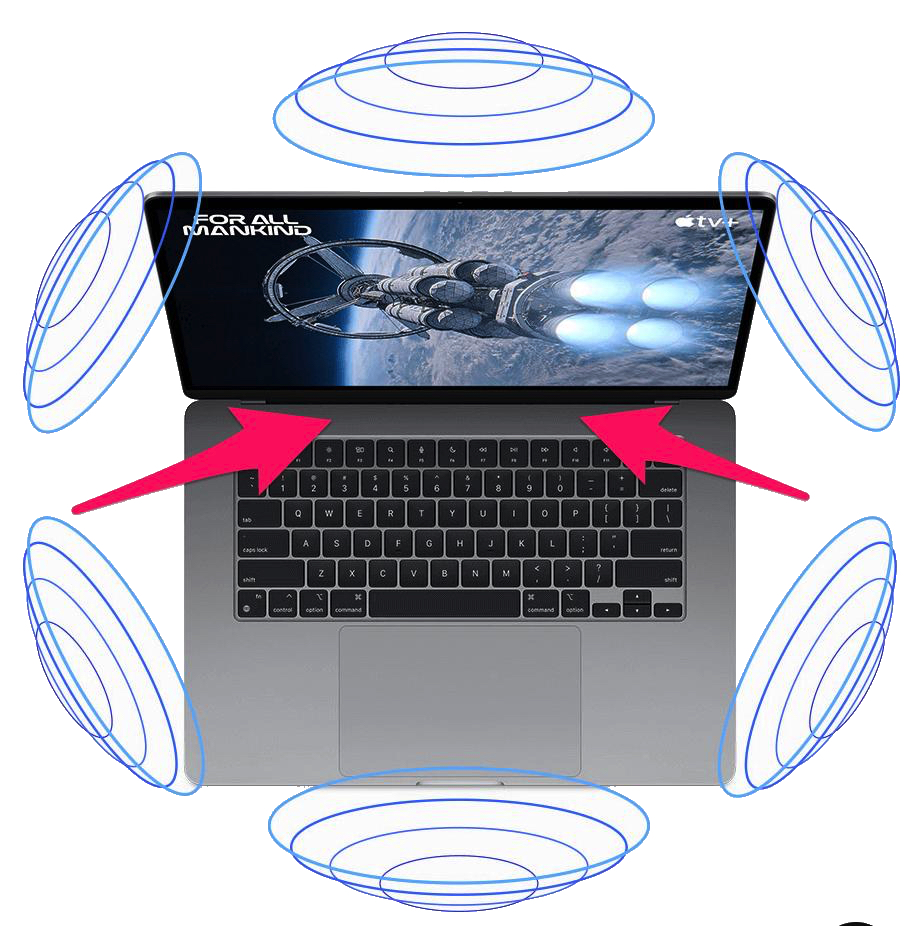
Modern Macs (M1 and later) use multi-driver speaker systems, especially in MacBook Pro models: typically six-speaker arrays with force-cancelling woofers (paired drivers that reduce chassis vibration) and separate tweeters. These systems are tightly integrated with Apple’s Core Audio DSP pipeline, enabling wide stereo imaging, psychoacoustic bass enhancement, and Spatial Audio (Dolby Atmos) playback. While still not a substitute for studio monitors, they are among the most advanced built-in laptop speakers, engineered as a complete acoustic system (drivers + enclosure + amplification + software tuning).
Many simple tweaks can improve your Mac’s internal speaker sound, and they’re often overlooked. First, enabling sound enhancements in System Settings → Sound → Output can make a noticeable difference. Turning on “Sound Check”ensures consistent volume across tracks, and applying an EQ—especially when using Apple Music—can tailor the audio to your preference.
You can also use system-wide EQ or DSP apps like eqMac or Boom 3D, which add bass boost, virtual surround, and customizable equalization, giving more control over the Mac’s audio output. Physical positioning is important too, as MacBook speakers are highly directional. Raising the laptop or angling it toward ear level improves clarity and stereo imaging. Additionally, reducing surface reflections can help; hard desks tend to reflect mid and high frequencies, so using a desk mat or stand can clean up the sound noticeably.
While these tweaks can help, they don’t overcome the fundamental limitation of small built-in drivers: limited bass and overall headroom.
When choosing external speakers for a Mac, it’s important to consider signal quality, connectivity, and driver design. Macs have excellent digital-to-analog conversion (DAC) and Core Audio processing, so speakers that can take full advantage of a clean digital signal tend to perform the best. Even small improvements in connectivity or enclosure design can make a noticeable difference compared to the Mac’s internal speakers.
Connectivity matters. USB speakers bypass the Mac’s analog output entirely, receiving a clean digital signal directly. Many high-quality desktop options, like the Audioengine A2+ or Creative Pebble V3, use USB for this reason. Standard 3.5 mm analog connections work fine, especially on budget systems, but they can introduce a small amount of noise or lose some detail compared with digital inputs. Bluetooth or wireless options offer convenience, but even with modern Mac support for AAC or aptX, there is often slight compression and latency. For critical listening, wired connections are generally superior.
Speaker type and size also make a big difference. Compact 2.0 stereo speakers with properly designed enclosures provide far better imaging and clarity than the Mac’s built-in speakers. Adding a subwoofer in a 2.1 system delivers real bass extension that tiny internal drivers cannot reproduce. Multi-driver setups, such as those with separate tweeters and woofers like the Kanto ORA or Audioengine A2+ Wireless, offer superior frequency response and stereo imaging, approaching studio-monitor quality in a desktop setup.
Finally, software tuning can enhance performance. Macs support system-wide EQ, and many speakers include their own DSP for audio shaping. Combining these allows you to get the most immersive sound possible, even from smaller desktop speakers. In short, the best external speakers for a Mac are USB or high-quality wired stereo speakers, ideally with a subwoofer or multiple drivers, which let the Mac’s Core Audio shine without forcing tiny internal drivers to over perform.
AirPlay is actually one of the best wireless audio options for a Mac—especially if you’re staying inside the Apple ecosystem. It sits somewhere between Bluetooth convenience and wired audio quality, but leans much closer to wired in terms of fidelity.
AirPlay works over Wi-Fi rather than direct device-to-device radio like Bluetooth. That gives it a major technical advantage: much higher bandwidth and little-to-no compression, which preserves more detail, stereo separation, and frequency range. In practice, this means cleaner highs, a wider soundstage, and more consistent quality—especially noticeable on better speakers. Bluetooth, by contrast, always uses some level of compression, which can reduce clarity depending on the codec.
Another advantage is range and flexibility. Because AirPlay runs over your Wi-Fi network, you’re not limited to sitting near your speakers—you can move anywhere in your house without losing connection. It also supports multi-room audio, allowing you to stream to multiple speakers at once with independent volume control, something Bluetooth generally cannot do.
That said, AirPlay isn’t perfect. It depends entirely on your network quality—weak Wi-Fi can introduce dropouts or latency. There’s also slightly more delay than a wired connection, which can matter for real-time work like audio production or video editing. And compared to a direct wired setup (USB or 3.5 mm), AirPlay can still fall short of true high-resolution, zero-latency audio.
Bottom line: AirPlay is arguably the best wireless option for Mac users—better sounding than Bluetooth and far more flexible—but if your goal is maximum fidelity or zero latency, a wired connection (USB or audio interface) still wins.
In most Mac models—including MacBooks, iMacs, and Mac minis—there are no officially supported upgraded replacement internal speakers that you can simply swap in for better sound the way you would with a desktop PC. The speaker systems in Macs are engineered as complete, chassis‑specific acoustic assemblies, with driver size, enclosure shape, damping, and DSP all matched to the exact case. Because Apple integrates the speakers with heat/plenum design, cooling pathways, and thin structural panels, there generally isn’t physical space or electrical provision for installing larger or “better” drivers without major modification.
Apple’s shift away from using Harman Kardon speakers (or other external audio brand partnerships) and not branding Macs with Beats audio—even though they own Beats—stems from strategic control and integrated design priorities.
Historically, in the late 1990s and early 2000s, Apple partnered with Harman Kardon for some desktop speaker systems, like the iconic Apple Pro Speakers, because Apple wanted recognizable high-quality audio but didn’t yet have the internal engineering to deliver that in thin laptops or iMacs. Similarly, HP and other PC makers often bundled Beats-branded audio for marketing appeal, but that required external certification and design compromises.
Apple today emphasizes system-level audio integration, where the drivers, enclosure, amplification, and DSP are all designed in-house to maximize fidelity in extremely thin or compact chassis. Modern Macs, especially Apple Silicon laptops, use multi-driver arrays, force-cancelling woofers, and spatial audio processing, all tightly coupled with Core Audio and macOS software. Using a third-party brand like Harman Kardon or Beats would limit Apple’s ability to optimize these complex, chassis-specific systems and might dilute their design consistency.
Essentially, Apple treats the Mac speaker system as a proprietary, integrated audio engineering problem, rather than a component to outsource for branding purposes. They don’t need a third-party logo to signal quality anymore—Apple relies on marketing the overall Mac experience, which now includes immersive, high-quality sound natively.