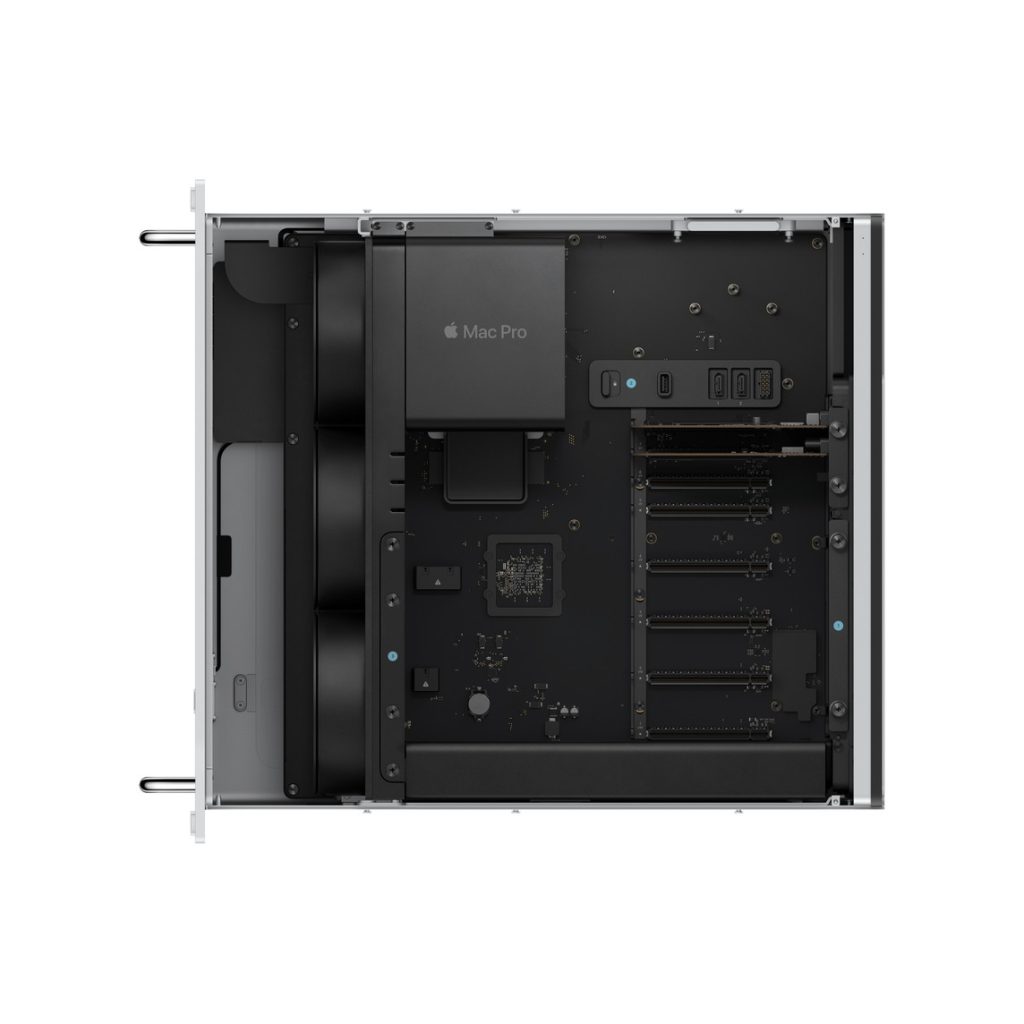
The Mac Pro is Apple’s high-end desktop computer designed for professional users who need extreme performance, expandability, and workstation-level capabilities. Unlike consumer Macs, the Mac Pro has historically been built around modular hardware, allowing users to configure powerful multi-core processors, large amounts of RAM, advanced graphics cards, and extensive storage options, often with internal expansion slots for specialized hardware. It is commonly used in industries like video production, 3D rendering, software development, and scientific computing where sustained heavy workloads are required. Over its various generations—from the older tower-style “cheese grater” design to the more recent cylindrical and then return to modular tower form—the Mac Pro has represented Apple’s most powerful and flexible desktop system, prioritizing performance and upgradeability over compact design.
The Mac Pro has gone through four major design generations (often described as five–six distinct model eras depending on how you group revisions) since its introduction.
The first era began in 2006–2008, when Apple transitioned from the Power Mac G5 to an Intel-based tower design that resembled a high-end PC workstation. This evolved into the 2009–2012 “classic tower” Mac Pro, which is often the most modular and upgradable version, using Xeon processors and standard PCIe expansion slots. In 2013, Apple dramatically shifted direction with the cylindrical “trash can” Mac Pro, a compact, thermal-core design that prioritized small size but limited internal expansion and ultimately became a controversial dead-end. Apple then returned to a modular design in 2019, reintroducing a large tower Mac Pro with modern Xeon CPUs and extensive PCIe expandability, closely echoing the original workstation philosophy. Finally, in 2023, Apple introduced the current Apple Silicon era Mac Pro based on the M2 Ultra, which retains the tower form factor but replaces traditional upgradeable CPUs and GPUs with a unified architecture focused on performance-per-watt and integration with Apple’s ecosystem.
The Mac Pro was designed to outperform all other Mac models by focusing on raw power, expandability, and sustained professional workloads rather than portability or cost efficiency. Its biggest advantage over systems like the MacBook Pro or iMac was true workstation-class performance, using high-core-count CPUs (historically Intel Xeon and now Apple Silicon Ultra-class chips) that could handle rendering, simulation, and large-scale data processing far more efficiently. It also offered far greater memory capacity and bandwidth, supporting significantly more RAM than consumer Macs, which is critical for video editing, 3D modeling, and scientific applications. Another key advantage was expandability, especially in tower generations, where users could install multiple GPUs, specialized PCIe cards (audio, video I/O, networking), and large internal storage configurations—capabilities most other Macs simply do not provide. The Mac Pro also excelled in thermal design and sustained performance, meaning it could run demanding tasks at full load for long periods without throttling, unlike thinner Macs that prioritize efficiency and compact cooling. Finally, it supported extensive multi-display setups and professional I/O options, making it a central hub for studios and production environments where reliability and throughput matter more than portability.
There isn’t a single “direct replacement” for the Mac Pro anymore in the way Apple used to position it. Instead, Apple has effectively split its high-end workstation role between a smaller, more efficient system and scalable external expansion.
The closest true replacement is the Mac Studio, which now serves as Apple’s primary professional desktop. It matches or exceeds Mac Pro performance in many configurations (using the same Apple Silicon class chips like Max and Ultra variants), while being significantly smaller, quieter, and far less expensive. For most workflows—video editing, 3D rendering, software development—the Mac Studio is functionally what the Mac Pro used to be, just without internal expansion.
Where the Mac Pro still differentiated itself was internal PCIe expansion and specialized hardware slots, but even that niche has largely been diminished in Apple Silicon systems because GPUs are no longer user-upgradable and many professional cards have moved to Thunderbolt or external solutions. As a result, Apple’s strategy has shifted toward external modularity (Thunderbolt docks, high-speed storage, and networking) rather than internal upgrades.
So in practical terms: the Mac Studio is the Mac Pro’s replacement for performance, while Apple’s broader ecosystem of Thunderbolt accessories replaces its expandability.
The Mac Studio is not designed for internal upgrades like older tower Macs, so its “expandability” comes almost entirely from external connectivity and peripherals rather than internal hardware changes.
In practice, you expand a Mac Studio through its Thunderbolt ports, USB ports, and high-speed I/O system. It includes multiple Thunderbolt (USB-C) ports that can drive external GPUs (not on Apple Silicon), ultra-fast SSDs, RAID storage arrays, audio interfaces, capture cards, and docking stations that add additional USB-A, HDMI, Ethernet, or SD card slots. It also supports daisy-chaining Thunderbolt devices, meaning you can connect multiple professional peripherals through a single port chain without major performance loss.
For display expandability, it supports multiple high-resolution external monitors simultaneously, often up to 5–8 displays depending on chip configuration, using Thunderbolt and HDMI outputs. This makes it especially strong for multi-monitor creative or trading setups.
Storage expandability is handled externally as well—via Thunderbolt 3/4/5 NVMe enclosures or high-speed RAID systems, which can approach internal SSD performance levels in real-world workflows. Networking can also be expanded through its built-in 10Gb Ethernet, or further enhanced with external adapters.
In short, the Mac Studio doesn’t grow internally like the Mac Pro once did; instead, it becomes a hub for modular, high-performance external systems, where nearly every aspect—storage, displays, I/O, and networking—can be scaled outward depending on your workflow.
The Mac Studio is not designed to be upgradeable in the traditional sense. Its core components—CPU, GPU, and unified memory—are all integrated directly into the Apple Silicon system-on-a-chip. This means you must choose your configuration at the time of purchase, since neither performance nor memory capacity can be upgraded later.
While the internal SSD is physically modular in some designs, Apple does not support user-level storage upgrades, and the system is not intended to be opened or modified by end users, however third party repair shops can upgrade the SSD in a Mac Studio. In practical terms, the internal hardware configuration is fixed for the life of the machine.
Where the Mac Studio does offer flexibility is through external expansion. It provides multiple Thunderbolt and USB ports that allow you to connect high-speed external storage, RAID arrays, docking stations, and additional peripherals. It also supports multiple high-resolution displays and can integrate advanced networking solutions, including high-speed Ethernet configurations.
Overall, the Mac Studio trades internal upgradeability for a sealed, highly optimized design, relying instead on external devices to extend its capabilities as needed.
The Mac mini and Mac Studio both sit in Apple’s “desktop Mac Pro replacement” tier, but they target different levels of professional workload, and that gap is important if you’re evaluating them against the old Mac Pro concept.
The Mac mini is the entry point into Apple Silicon desktops. It delivers excellent performance for its size and price, especially in M4 and M4 Pro configurations, and it can absolutely handle professional tasks like 4K editing, software development, and light-to-moderate 3D work. However, it is fundamentally constrained by lower sustained power limits, fewer GPU cores, and more limited connectivity, typically offering fewer Thunderbolt ports and reduced display capacity compared to higher-tier systems. It replaces what used to be “entry workstation” Macs, not the fully expandable Mac Pro class.
The Mac Studio, by contrast, is designed as the true successor to the performance tier of the Mac Pro for most users. It offers significantly higher-end chips (Max and Ultra-class Apple Silicon), much greater memory bandwidth, and better thermal headroom for sustained workloads. In practice, this translates to faster rendering, smoother multi-stream video workflows, heavier 3D scenes, and more simultaneous external displays and high-speed peripherals. It also provides more I/O flexibility, including additional Thunderbolt ports and front-facing connectivity, making it much closer to a traditional workstation environment.
Where the distinction becomes clear is in “pro load endurance.” The Mac mini can perform many of the same tasks, but the Mac Studio maintains higher performance for longer without throttling and handles significantly larger project scales. That’s why, in the post–Mac Pro (Intel/early Apple Silicon) landscape, the Mac Studio is widely viewed as the true Mac Pro replacement, while the Mac mini is more of a “compact pro desktop” that overlaps only at the lower end of professional workflows.
Apple discontinued the Mac Pro primarily because it no longer fit cleanly into its modern hardware and product strategy, rather than due to a single technical failure or lack of demand.
The biggest factor is Apple’s shift to Apple Silicon architecture, which fundamentally changes how professional performance is delivered. With unified memory and tightly integrated CPU/GPU design, many of the traditional advantages of the Mac Pro—like internal PCIe expansion and user-upgradable components—lost relevance. Apple increasingly moved toward a model where performance is preconfigured at purchase and scaled externally, rather than upgraded internally over time.
Another major reason is product overlap and simplification of the desktop lineup. The Mac Studio now delivers similar or higher real-world performance for most professional workflows while being smaller, quieter, and cheaper to produce. That created a situation where the Mac Pro had limited differentiation outside of niche expansion use cases, which had already been shrinking as more professional hardware moved to Thunderbolt-based external devices.
There is also a broader industry shift at play: many workflows that once required a large tower workstation (like multi-GPU rendering or internal capture cards) have moved to distributed compute, cloud rendering, and external I/O ecosystems. As a result, demand for a highly modular internal workstation has steadily declined compared to the Intel-era Mac Pro’s peak relevance.
In short, Apple discontinued the Mac Pro because its original purpose—an internally expandable, component-upgradable workstation—no longer aligned with the direction of Apple Silicon or how modern professional workflows are structured.