
MacBook Pro 14-inch $1699
Mac16,8
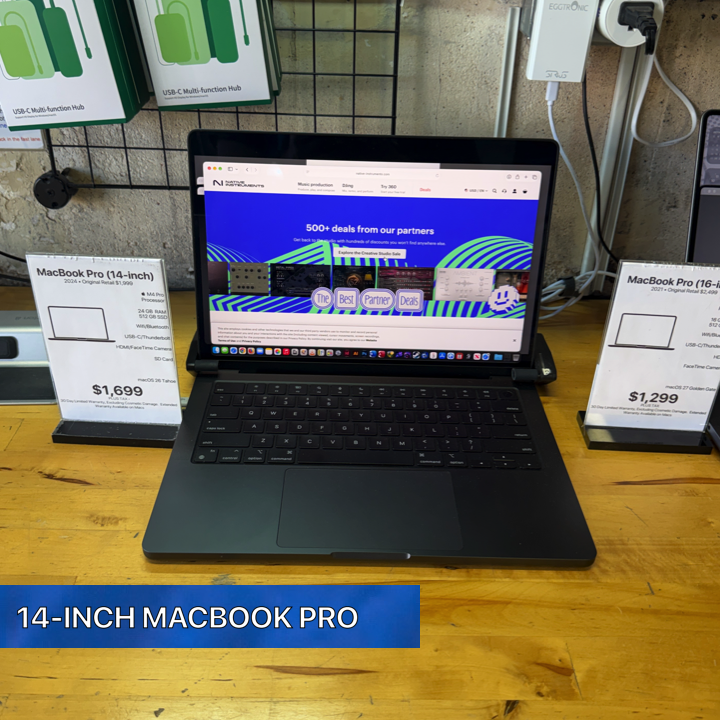
| MacBook Pro 14-inch |
|---|
| “M4 Pro muscle, 24 GB of memory, and 14 inches of “go ahead, give me something to do.”“ |
| The 14-inch MacBook Pro with the M4 Pro processor, 24 GB of RAM, 512 GB of solid-state storage, Apple GPU graphics, a 1080p FaceTime HD camera, Wi-Fi 6, Bluetooth 5, three Thunderbolt 4 ports, HDMI 2, a full-size Magic Keyboard, and a Force Touch trackpad is best suited for someone who wants a compact MacBook Pro with a generous amount of memory, versatile connectivity, and the performance-oriented character of Apple’s M4 Pro platform. It brings together a portable 14-inch format and a specification that feels equally at home on a desk, in a backpack, at a client meeting, in a classroom, or moving between several workspaces throughout the day. |
LEARN MORE
| This MacBook Pro particularly appeals to the person who sees a laptop as a primary computer rather than simply a companion computer. With 24 GB of RAM, the machine provides a substantial memory configuration for people who keep plenty happening at once. A browser with numerous tabs, communication applications, office software, creative applications, file-management windows, and other everyday tools all have room to participate in the workflow. The M4 Pro processor sits at the center of the experience, while the Apple GPU provides integrated graphics resources for visually oriented work. For the professional who spends the day moving among projects, applications, documents, websites, messages, presentations, and media, this configuration offers an attractive balance. Twenty-four gigabytes of memory gives the machine a generous workspace for multitasking, and 512 GB of storage provides local space for applications, documents, photographs, project materials, presentations, downloads, and other working files. The combination makes this MacBook Pro especially appealing to someone who wants a computer that comfortably serves as the center of a broad digital workflow. The 14-inch form factor also makes this machine particularly well suited to professionals who divide their time between a desk and the wider world. It has the personality of a serious MacBook Pro while remaining compact enough for mobile work. It travels from the office to home, from a meeting to a presentation, from a classroom to a study session, or from a studio to a client visit with ease. For someone whose computer frequently comes along for the ride, the 14-inch format makes a lot of sense. A business professional is an excellent match for this MacBook Pro. Modern business workflows often involve a mixture of email, web applications, spreadsheets, documents, presentations, videoconferencing, cloud services, PDFs, calendars, messaging platforms, and specialized software. This machine’s 24 GB of RAM gives those workflows plenty of breathing room, while the M4 Pro processor provides the foundation for a responsive professional environment. A person can move among different parts of the workday while keeping the MacBook Pro at the center of the operation. It also fits managers and business owners who handle a little bit of everything. One moment involves reviewing a spreadsheet, another involves joining a video call, another involves preparing a presentation, and another involves looking through photographs, PDFs, or marketing material. That kind of varied workload is exactly where a broadly equipped MacBook Pro becomes appealing. Instead of defining the machine around one narrow task, this configuration supports a diverse collection of tasks and gives the owner room to organize work according to the needs of the day. The 1080p FaceTime HD camera adds another useful component for professionals whose work includes remote meetings, consultations, classes, interviews, or conversations with colleagues and clients. Video communication is now a regular part of many workdays, and an integrated 1080p camera keeps that communication directly within the laptop. For the person who moves between locations, the built-in camera supports a simple routine: open the MacBook Pro, enter the meeting, and get to work. The full-size Magic Keyboard also makes the machine appealing to anyone whose day involves substantial typing. Writers, administrators, students, researchers, consultants, business owners, educators, and communications professionals spend a significant portion of their computer time producing text. Emails, reports, proposals, articles, assignments, notes, documentation, and presentations all depend on the keyboard. A full-size integrated keyboard keeps the MacBook Pro ready for that work wherever it goes. The Force Touch trackpad complements the keyboard and gives the machine a familiar MacBook interface for navigation and interaction. For mobile users, this matters because the computer already contains its principal input devices. The user opens the display and immediately has the keyboard and trackpad ready for the next task. At a desk, external accessories can become part of the setup according to personal preference, while the integrated keyboard and trackpad remain available whenever mobility becomes the priority. Creative users are another strong audience for this configuration. The combination of an M4 Pro processor, 24 GB of RAM, Apple GPU graphics, and 512 GB of storage gives the machine an appealing specification for creative workflows. Designers, photographers, content creators, illustrators, musicians, and other creative professionals frequently work with several applications and assets at the same time. Memory becomes particularly valuable in this environment because creative work often involves moving among the project itself, reference material, communication tools, file browsers, web resources, and supporting applications. A photographer, for example, often works with a combination of image files, organizational tools, browser windows, client communications, cloud services, and project folders. Twenty-four gigabytes of memory gives this type of workflow substantial room. The 512 GB of internal storage provides useful local capacity for active projects and applications, while the MacBook Pro’s three Thunderbolt 4 ports provide connectivity for compatible peripherals and storage devices as part of a larger workflow. Those three Thunderbolt 4 ports are an especially attractive part of this MacBook Pro for users who build their laptops into desktop workspaces. A portable computer becomes even more versatile when it can connect with the devices surrounding it, and three Thunderbolt 4 connections give the owner multiple high-speed USB-C connector locations for compatible equipment. A desk can include storage, accessories, displays, or other peripherals according to the user’s needs and the specifications of those devices. HDMI 2 adds another convenient connection. This makes the MacBook Pro particularly appealing to people who regularly connect a computer to compatible displays, televisions, projectors, presentation systems, or other HDMI equipment. A consultant can arrive at a meeting with the MacBook Pro, an educator can incorporate the computer into a classroom setup, and a home user can integrate the laptop with compatible entertainment or display equipment. HDMI gives the machine another useful connection option alongside its three Thunderbolt 4 ports. That port selection makes the machine particularly interesting for someone who wants one computer to live two lives. Away from the desk, it functions as a self-contained 14-inch MacBook Pro with its own keyboard, trackpad, camera, wireless networking, storage, memory, processor, and graphics. At the desk, its Thunderbolt 4 and HDMI connectivity allows it to become part of a larger environment. For the right owner, that means the same Mac travels during the day and settles into a more expansive workspace when it comes home. Students whose studies involve demanding or varied computer work are also well suited to this MacBook Pro. A student’s workload often extends far beyond writing a paper. Research can involve dozens of browser tabs, digital textbooks, PDFs, notes, communication software, presentations, media, spreadsheets, online course systems, and specialized applications. With 24 GB of RAM, this MacBook Pro provides a generous memory configuration for a student who likes to keep research materials and applications readily available while working. Graduate students and researchers may find the configuration particularly appealing because research workflows naturally become complex. A research session can involve source documents, databases, browser tabs, notes, spreadsheets, presentation software, videoconferencing, and writing applications. The 14-inch format also suits someone who moves between home, a classroom, a library, an office, a laboratory, and meetings. It gives the user a portable computer with the M4 Pro processor and a substantial amount of memory in one package. Educators can appreciate many of the same characteristics. Lesson preparation, presentations, grading, communication, research, video meetings, web-based educational platforms, and document creation all fit naturally into the machine’s broad capabilities. HDMI 2 can be useful in presentation environments with compatible equipment, while the 1080p FaceTime HD camera supports online instruction and meetings. Wi-Fi 6 provides modern wireless networking connectivity, and Bluetooth 5 supports compatible wireless peripherals. The machine also suits a writer who wants a MacBook Pro that handles far more than a word processor. Professional writing frequently involves research, web browsing, communication, document comparison, PDFs, photographs, content-management systems, video meetings, and extensive collections of source material. The full-size Magic Keyboard serves as the central tool for the writing itself, while the M4 Pro processor and 24 GB of memory support the broader environment surrounding the writing process. Journalists, editors, communications professionals, and marketing specialists similarly work across a wide collection of media. Their day can include writing, editing, reviewing images, organizing files, researching topics, participating in video calls, preparing presentations, and working in browser-based publishing systems. This MacBook Pro has the kind of balanced specification that makes sense for that multifaceted workload. Marketing professionals are particularly good candidates because marketing increasingly combines creative and administrative tasks. A marketing project can move from a spreadsheet to a presentation, from a browser to an image, from an email conversation to a video meeting, and from research to finished copy in a matter of minutes. Twenty-four gigabytes of RAM supports this application-rich style of work, and the 512 GB of storage provides room for a useful collection of local applications and project files. For an entrepreneur, this MacBook Pro has similar appeal. Running a business means wearing several hats, sometimes before lunch. The owner may become the accountant, marketer, salesperson, project manager, researcher, presenter, customer-service representative, and creative director in the same day. A versatile computer fits that reality particularly well. The M4 Pro processor, 24 GB of RAM, Apple GPU, and multiple connection options create a platform that can participate in many parts of the business. Consultants also make an excellent audience. Consulting frequently requires a machine that travels easily and presents professionally while supporting presentations, analysis, research, communication, and document creation. The 14-inch MacBook Pro fits into that environment naturally. Its HDMI 2 connection can participate in compatible presentation setups, the 1080p FaceTime HD camera supports remote consultations, and Wi-Fi 6 keeps wireless networking at the center of the mobile workflow. The MacBook Pro also suits someone who spends part of the week working remotely. A remote worker typically needs a machine that functions as a complete workstation wherever the work happens. At home, the Thunderbolt 4 and HDMI connections can participate in a larger desk configuration. At another location, the built-in keyboard, Force Touch trackpad, 1080p camera, Wi-Fi 6, and Bluetooth 5 allow the computer to operate as a self-contained workspace. Hybrid workers may find that flexibility especially valuable. The laptop moves between an office and home while the user’s files and applications remain on the same computer. A person can create a desk setup in each location using compatible equipment and carry the MacBook Pro between them. The 14-inch size supports mobility, while the Pro-oriented processor and 24 GB memory configuration give the machine the character of a primary work computer. Software developers and technical users who value memory and a Pro-series processor may also find this configuration attractive. Development work commonly involves editors, browsers, documentation, communication applications, terminals, local files, and multiple supporting utilities operating together. Twenty-four gigabytes of RAM gives a technical user a substantial memory pool for a multitasking workflow, while the M4 Pro processor provides the central computing platform. IT professionals can appreciate the machine for similar reasons. Technical work often involves documentation, browser-based administration, remote sessions, communication tools, diagnostic information, spreadsheets, scripting environments, and multiple windows operating together. The three Thunderbolt 4 ports also make the MacBook Pro adaptable when compatible storage devices, adapters, displays, or other peripherals become part of the job. The MacBook Pro is equally appealing to the advanced home user who simply enjoys having a powerful, well-equipped computer. A computer does not need to live inside a professional studio or corporate office to benefit from 24 GB of memory. A home user may maintain a large photo collection, manage household documents, participate in video calls, research projects, shop online, work with personal media, organize files, use cloud services, and keep numerous applications open throughout the day. For this user, the machine provides a comfortable amount of computing headroom. The M4 Pro processor gives the MacBook Pro its performance-oriented foundation, while the memory allows the owner to build a broad multitasking environment. The computer can move naturally between everyday activities and more involved projects without changing its identity. It remains one MacBook Pro that serves many purposes. Families may also appreciate this kind of versatility when the computer serves several roles. It can become a household administration machine, a school computer, a communication center, a creative workstation, and a general-purpose Mac. The 1080p FaceTime HD camera supports video communication, the 512 GB of storage provides local space for files and applications, and Wi-Fi 6 provides wireless network connectivity for the modern home. The 512 GB storage configuration is especially well suited to someone who wants meaningful internal capacity for a working collection of applications and files. Documents, presentations, photographs, downloads, school projects, business records, and active creative materials can all occupy local storage. Users who incorporate compatible external storage into their workflow can connect devices through the MacBook Pro’s Thunderbolt 4 ports, giving the machine a natural place in a broader storage strategy. People who already rely on cloud storage can also make effective use of the 512 GB internal drive. The internal storage serves as the local home for applications and selected files, while cloud services can participate according to the user’s preferred workflow. This creates an appealing arrangement for a mobile professional or student who wants a useful amount of built-in storage while also working across online services. The Apple GPU makes the machine particularly appealing to users whose work includes visual content. Graphics are a central part of the M4 Pro system described here, making the MacBook Pro a natural candidate for people who interact with photographs, design elements, presentations, visual interfaces, and other graphics-oriented material. Combined with the M4 Pro processor and 24 GB of memory, the Apple GPU contributes to a configuration designed around more than basic computing. Musicians and audio-oriented creators can also appreciate a portable Pro-series Mac with 24 GB of memory and multiple Thunderbolt 4 connections. Modern music workflows often combine project files, audio applications, plugins, reference material, communication tools, and connected equipment. The MacBook Pro’s compact format makes it attractive for someone who works in multiple locations, while its connectivity allows compatible equipment to become part of a studio or mobile setup. A DJ, performer, or event professional can similarly value a computer that combines portability with a broad selection of built-in connections. Three Thunderbolt 4 ports and HDMI 2 give the MacBook Pro multiple ways to integrate with compatible equipment. The 14-inch format travels readily, while 24 GB of RAM gives the owner a substantial memory configuration for a software-centered workflow. Presenters are another natural fit. Whether the presentation happens in a boardroom, classroom, conference space, studio, or community venue, HDMI 2 provides a direct connection option for compatible presentation equipment. The MacBook Pro can carry the presentation, supporting documents, browser resources, notes, and other materials together. Its 14-inch size makes it convenient to bring along, and its built-in keyboard and trackpad keep the complete working interface with the presenter. For someone who spends a great deal of time in videoconferences, the 1080p FaceTime HD camera deserves particular attention. The camera is integrated directly into the MacBook Pro, which means the machine arrives ready for compatible video communication software. A remote employee, consultant, instructor, student, manager, or business owner can make video communication part of the regular workflow without turning the laptop into a complicated collection of pieces. Wi-Fi 6 is similarly important for the person who depends on wireless connectivity. Offices, homes, schools, hotels, studios, and other environments increasingly center their computer workflows around wireless networks. This MacBook Pro includes 802.11ax Wi-Fi 6, giving it a modern wireless networking specification for compatible networks. Bluetooth 5 adds connectivity for compatible wireless accessories. Keyboards, pointing devices, headphones, speakers, and other Bluetooth equipment can become part of the user’s setup according to individual requirements and device compatibility. This is especially useful for a computer that frequently moves between mobile and desktop environments because the user can create a personalized collection of accessories around the MacBook Pro. The person who appreciates a clean desk setup can also find a lot to like here. The laptop already contains the computer, display, keyboard, trackpad, camera, wireless networking, storage, memory, processor, and graphics in one integrated device. When additional compatible peripherals become part of the workspace, Thunderbolt 4 and HDMI 2 provide wired connection options, while Wi-Fi 6 and Bluetooth 5 handle wireless connectivity. At the opposite end of the spectrum, the person who prefers to work with the laptop by itself also gets a complete package. The full-size Magic Keyboard and Force Touch trackpad provide integrated input, the camera supports video communication, and wireless connectivity handles networking and compatible accessories. That makes this MacBook Pro equally comfortable on a desk or operating independently in a mobile setting. This flexibility is one of the strongest reasons to choose a 14-inch MacBook Pro with an M4 Pro processor and 24 GB of RAM. It appeals to someone who wants one machine that adapts to changing circumstances throughout the day. It can be a writing machine in the morning, a presentation computer at midday, a videoconferencing system in the afternoon, and a creative workstation later on. The hardware remains the same while the role changes according to the owner’s needs. The 24 GB memory configuration plays an important role in that flexibility. Memory supports the active working environment of the computer, and a generous memory configuration becomes especially valuable for users who like to keep multiple applications and projects accessible. Rather than structuring every work session around a single activity, the user can build a broader workspace containing the applications and information relevant to the project. That characteristic makes this machine particularly attractive to people who think in projects rather than individual applications. A project rarely lives entirely inside one program. A presentation may involve research, images, documents, email, web resources, and the presentation itself. A creative project may involve reference materials, communication, asset management, and the creative application. A business project may involve spreadsheets, PDFs, messages, browser applications, and video meetings. Twenty-four gigabytes of RAM suits this interconnected style of computing. The M4 Pro processor also identifies the machine as a compelling choice for a buyer specifically seeking Apple’s Pro-series silicon. This user wants a MacBook Pro with a processor that carries the Pro designation and pairs it with 24 GB of RAM. The combination creates a machine positioned for someone whose computing extends across professional, creative, academic, technical, and advanced personal uses. There is also a strong case for this MacBook Pro as a long-term primary computer from a workflow perspective. A person choosing a primary machine often wants enough memory, storage, connectivity, and versatility to accommodate a broad range of activities. This configuration brings 24 GB of RAM, 512 GB of storage, three Thunderbolt 4 ports, HDMI 2, Wi-Fi 6, Bluetooth 5, a 1080p FaceTime HD camera, a Magic Keyboard, a Force Touch trackpad, an Apple GPU, and the M4 Pro processor together in one system. For an office professional, that means one Mac for communication, documentation, presentations, spreadsheets, research, meetings, and web applications. For a creative professional, it means one Mac for projects, assets, communication, reference materials, and connected equipment. For a student, it means one Mac for classes, research, assignments, presentations, and video communication. For a home user, it means one Mac for everyday computing and ambitious personal projects. The machine also makes sense for someone who values physical connectivity. Three Thunderbolt 4 ports provide multiple USB-C connector locations, while HDMI 2 adds a dedicated connection option for compatible video equipment. This combination is useful for users who regularly connect a laptop to a larger working environment. A person who works with external displays can appreciate that emphasis on connectivity. A person who carries compatible external storage can appreciate it as well. Presenters can value HDMI. Users of compatible Thunderbolt and USB-C peripherals have three Thunderbolt 4 ports available. The laptop therefore works as both a self-contained computer and the center of a connected setup. The full-size Magic Keyboard and Force Touch trackpad further reinforce that dual identity. When the MacBook Pro is away from a desk, its built-in controls are ready. When it joins a desktop environment, the owner can integrate compatible external equipment according to preference. The computer adapts to both arrangements without asking the user to choose one permanent style of working. Someone who frequently changes work locations is perhaps one of the clearest candidates for this machine. The 14-inch format is naturally suited to movement. A consultant can carry it between clients. A student can take it across campus. A manager can move between offices and meeting rooms. A photographer can bring it to a project location. A writer can work from several environments. An educator can carry it between classrooms and home. In each case, the same M4 Pro processor, 24 GB of RAM, 512 GB of storage, Apple GPU, camera, wireless connectivity, and ports come along. It is also a compelling configuration for a person whose workday combines local and online activity. Wi-Fi 6 handles compatible wireless networks, Bluetooth 5 handles compatible accessories, and the internal hardware handles local applications and files. Thunderbolt 4 and HDMI 2 extend the setup to compatible wired devices. The result is a machine that participates comfortably in both wireless and connected environments. For the person who wants a MacBook Pro specifically because the computer serves as a professional tool, this configuration has a clear identity. The M4 Pro processor carries the Pro designation, the 24 GB memory configuration supports substantial multitasking, and the connectivity provides room for a broader workstation. The 14-inch size keeps that professional platform portable. For the person who wants a MacBook Pro because computing is also a hobby, the appeal is just as strong. Enthusiasts often enjoy exploring software, organizing media, experimenting with creative projects, connecting accessories, and building an efficient workspace. This MacBook Pro gives that user a capable foundation with plenty of memory and several connection options. Even someone whose workload sounds ordinary can benefit from the overall specification when that ordinary workload happens at a high volume. Hundreds of emails, numerous browser tabs, large collections of documents, constant videoconferencing, extensive research, multiple communication applications, and regular presentations can make everyday computing remarkably busy. The 24 GB memory configuration is particularly attractive for this kind of user because it gives the active workspace generous capacity. The MacBook Pro also fits someone who values simplicity through consolidation. Instead of maintaining separate computers for mobile work and desk work, this machine can fill both roles. Instead of moving files and projects between separate systems throughout the day, the owner carries the primary MacBook Pro from one environment to another. Its ports allow it to join compatible desk equipment, and its built-in hardware allows it to operate independently when the desk stays behind. This approach can be especially elegant for a small-business owner. At the business, the MacBook Pro can connect to compatible office equipment. During a meeting, it becomes a presentation and note-taking computer. At home, it continues as the same working environment. During travel, it remains the same computer with the same local files and applications. The 14-inch form factor makes that continuity practical. The same idea applies to a creative freelancer. The MacBook Pro can serve as the center of a home workspace, travel to a client, participate in a presentation, handle communication, and return to the main desk. The M4 Pro processor and Apple GPU provide the computational core, 24 GB of memory supports the active workspace, and 512 GB of storage provides local capacity for applications and project materials. For students entering fields that blend creative, technical, and traditional academic work, this MacBook Pro is particularly compelling. Modern education increasingly crosses categories. A single course may involve writing, presentations, media, research, online collaboration, and specialized software. A machine with a Pro-series processor and 24 GB of memory provides an appealing platform for a student whose studies involve a diverse set of digital tools. The MacBook Pro also suits someone who simply likes to buy a computer with room for ambitious ideas. Today’s workflow might revolve around documents, web browsing, and communication. Tomorrow’s project might involve photography, design, music, coding, research, presentations, or another creative pursuit. A broadly equipped MacBook Pro gives the owner a platform that invites exploration. Ultimately, the person best suited for this 14-inch MacBook Pro is someone who wants portability and serious computing resources to coexist. The M4 Pro processor establishes its performance-oriented foundation. The 24 GB of RAM gives the system a generous memory configuration for multitasking. The 512 GB of storage provides useful local capacity. The Apple GPU supports graphics-oriented computing. The 1080p FaceTime HD camera serves modern video communication. Wi-Fi 6 and Bluetooth 5 provide wireless connectivity. Three Thunderbolt 4 ports and HDMI 2 give the machine a versatile collection of physical connections. The full-size Magic Keyboard and Force Touch trackpad complete the integrated portable workspace. It is a particularly strong match for professionals, business owners, consultants, managers, educators, students, researchers, writers, creators, technical users, remote workers, hybrid workers, presenters, and advanced home users. More broadly, it fits anyone who wants a 14-inch MacBook Pro that comfortably shifts between different roles throughout the day. This is the kind of MacBook Pro for the person whose answer to “What do you use your computer for?” keeps getting longer. Work, create, research, present, communicate, organize, connect, travel, and come back tomorrow with another idea. The M4 Pro processor, 24 GB of RAM, 512 GB of storage, Apple GPU, three Thunderbolt 4 ports, HDMI 2, Wi-Fi 6, Bluetooth 5, 1080p FaceTime HD camera, Magic Keyboard, and Force Touch trackpad all contribute to a machine designed around versatility. For the professional who wants one Mac to move through an entire workday, it fits. For the student who carries an increasingly digital workload, it fits. For the creator who keeps projects, research, communication, and assets moving together, it fits. For the business owner whose job description changes every fifteen minutes, it fits. For the home user who enjoys having substantial computing resources available whenever inspiration arrives, it fits. Most of all, this 14-inch MacBook Pro is best suited for someone who appreciates a compact machine with a decidedly substantial specification. Twenty-four gigabytes of memory gives it room to work. The M4 Pro gives it its Pro-series heart. The Apple GPU provides its graphics platform. The 512 GB of storage keeps applications and working files close at hand. Thunderbolt 4 and HDMI 2 connect it to a larger workspace. Wi-Fi 6 and Bluetooth 5 keep it connected wirelessly. The Magic Keyboard and Force Touch trackpad make the complete workspace immediately available every time the lid opens. It is a MacBook Pro for someone who expects a laptop to earn the word “Pro” by becoming part of many different kinds of work. It travels like a 14-inch notebook, connects like a workstation, communicates through its 1080p FaceTime HD camera, and carries 24 GB of memory for the busy collection of applications and projects that define a modern computing day. In classic Denver Mac Repair spirit, the easiest way to describe the ideal owner is simple: this MacBook Pro suits the person who opens a computer to accomplish one thing and somehow has twelve things happening five minutes later. With an M4 Pro processor, 24 GB of RAM, Apple GPU graphics, 512 GB of storage, three Thunderbolt 4 ports, HDMI 2, Wi-Fi 6, Bluetooth 5, a 1080p FaceTime HD camera, a full-size Magic Keyboard, and a Force Touch trackpad, it arrives ready to make that kind of ambition feel right at home. |
| Features Support for Apple Intelligence and Siri AI. |
| Denver Mac Repair Warranty 30 days from purchase, excludes cosmetic damage, Extended Warranty available. |
Check Out these other Available Macs and Apple devices!
- MacBook Air 13-inch “Big M2 energy in a sleek little MacBook Air—fast, featherlight, and ready to make your workload jealous.”

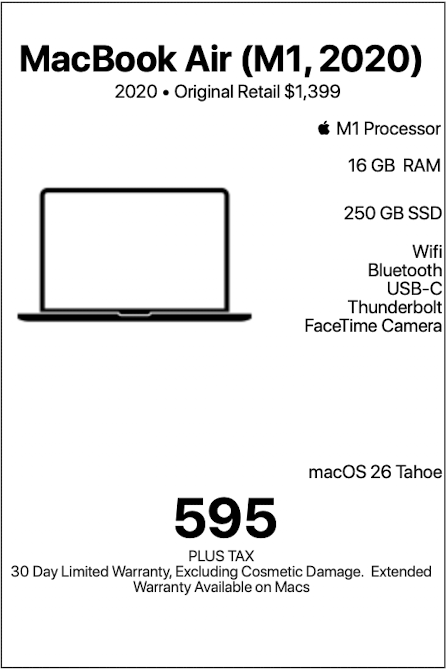
- MacBook Air 13-inch “Small in size, mighty with M1—this MacBook Air brings big energy to your everyday adventures.”
- MacBook Air 13-inch “Light on its feet, loaded with storage, and powered by M1 magic.”
- MacBook Pro 16-inch “M1 Pro power, 16 GPU cores, and 16 inches of “go ahead, open another app.””
- MacBook Pro 16-inch “Serious performance. Seriously good deal.”
- iPhone Air “Thin enough to disappear in your pocket. Powerful enough to steal all your attention.”
- Mac mini w/23-inch Display “Less chaos. More aluminum.”
- DENVER MAC REPAIR IS PURCHASING APPLE DEVICES!!




Denver Mac Repair is not associated with Affirm, see app (click logo above) for terms, conditions and detail.
Also visit Boulder Mac Repair – 2525 Broadway, Boulder CO 80304
Boulder Mac Repair – Macs for Sale
See shop for current availability. Apple equipment sales are final.
Any errors are wholly unintentional and we apologize if erroneous information is reflected in merchandise price, item availability, or in any way affects your individual order.
Denver Mac Repair reserves the right to correct any errors, inaccuracies or omissions and to change or update information at any time without prior notice.
Denver Mac Repair reserves the right to cancel any promotion, or offer at any time and for any reason.


