
Mac mini w/23-inch Display $299
Macmini7,1
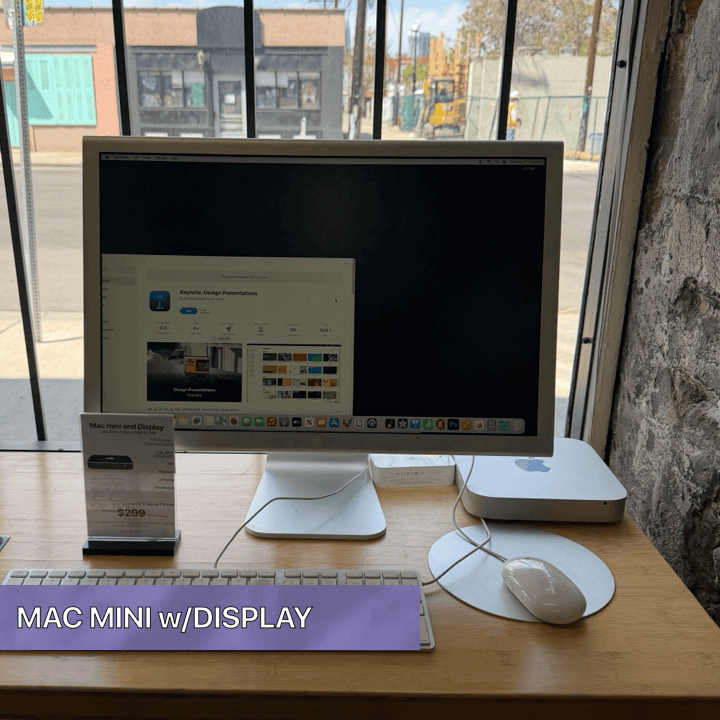
| DISCOUNTED (NO BLUETOOTH) Now: $279 |
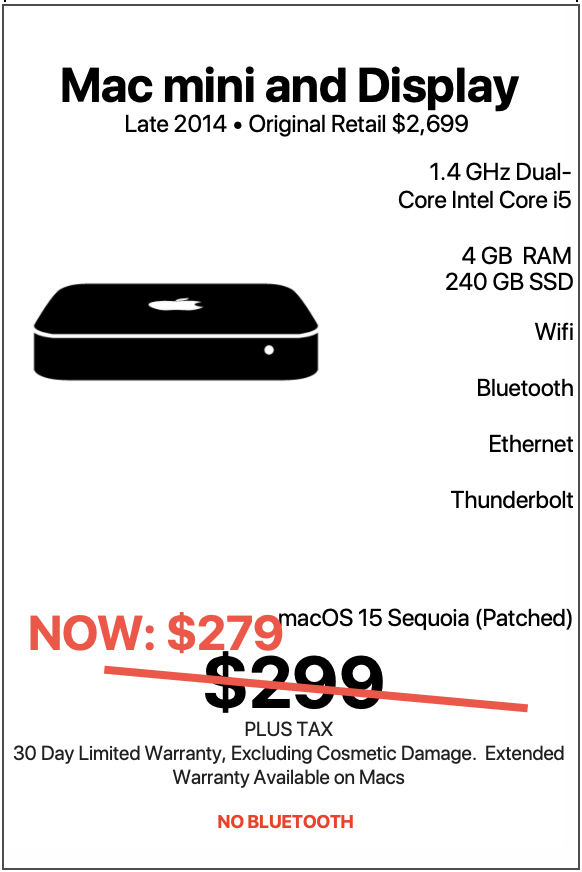
| Mac mini w/ 23-inch Display |
|---|
| “Less chaos. More aluminum.” |
| There is a certain kind of computer setup that quietly wins people over the second they sit down in front of it. No fanfare. No neon lights. No giant marketing campaign promising to revolutionize humanity with a laptop that is somehow thinner than a tortilla chip. Just a clean aluminum desktop setup that turns on every morning, gets real work done, looks fantastic on a desk, and keeps moving through life with the confidence of a machine that already proved itself years ago. |
LEARN MORE
| That is exactly where the 2014 Mac mini with the 23-inch Cinema Display lands. This is not the setup for somebody who wants to spend their weekends benchmarking frame rates while arguing online about thermal envelopes. This is not the setup for somebody trying to impress strangers at a coffee shop. This is a practical, polished, reliable Apple desktop system that delivers an authentic Mac experience in a compact footprint while still feeling surprisingly premium. And when paired with a gorgeous 23-inch Cinema Display, a USB Apple Keyboard with number pad, and the wonderfully nostalgic USB Mighty Mouse, this machine becomes something even better: a complete Apple desktop environment that feels intentional. For $299 with warranty, this setup fills a very specific role in the modern Mac world. It is ideal for people who want a real desktop computer without spending the price of a used car. It is perfect for users who appreciate functionality, simplicity, familiarity, and value packed into a system that still looks right at home in 2026. Even better, it runs a patched version of macOS 26 Tahoe, which means users get the visual polish and modern software feel of Apple’s current ecosystem while enjoying the comfort and practicality of classic Apple hardware. And perhaps the best part? This machine is approachable. No complicated setup. No dongle explosion. No mystery. No nonsense. Just a capable Mac desktop setup that works beautifully for a surprisingly large group of people. The Ideal Everyday Home User The first person who fits this Mac mini setup perfectly is the everyday home user. This is somebody who wants a dependable desktop computer for normal life. Email. Web browsing. Photos. Online shopping. Paying bills. Watching YouTube videos. Managing calendars. Printing documents. Video chatting with family. Streaming music. Organizing files. Running basic productivity applications. For this kind of user, the 2014 Mac mini feels refreshingly balanced. The 1.4 GHz Dual-Core Intel Core i5 processor handles ordinary computing tasks with ease. macOS Tahoe provides a modern and visually polished environment. The 240 GB solid state drive gives the system a snappy and responsive feel that transforms everyday interaction into something smooth and satisfying. And because it is a desktop setup, it naturally encourages comfort. The full-size USB Apple Keyboard with number pad is excellent for users who spend long stretches typing, entering data, or managing spreadsheets. The included number pad becomes especially useful for budgeting, taxes, bookkeeping, and general household management. Meanwhile, the 23-inch Cinema Display gives users a spacious visual workspace that feels dramatically more comfortable than tiny laptop screens. Reading text is easier. Photos look better. Websites breathe more naturally. Multiple windows can sit side-by-side without feeling cramped. This matters more than people think. A comfortable desktop setup changes the way people interact with technology. It becomes less about squeezing work onto a tiny portable screen and more about having an actual workspace that feels calm, organized, and usable. For retirees, casual users, and families, this machine fits beautifully into daily life. The Perfect Computer for Someone Switching From Windows One of the most overlooked strengths of a Mac mini setup like this is how approachable it feels for somebody entering the Apple ecosystem for the first time. A lot of people become curious about Macs but hesitate because they assume the cost of entry is enormous. New Apple desktops can easily move into premium pricing territory. That makes experimentation feel risky. This setup changes the equation entirely. For $299, users get a complete desktop experience with a monitor, keyboard, mouse, solid-state storage, Wi‑Fi, Bluetooth, and macOS Tahoe. That is important. This is not just a computer. It is a ready-to-go Apple desktop environment. A first-time Mac user can sit down and immediately understand why so many people stay with macOS for years. The operating system feels cohesive. The desktop feels uncluttered. The software ecosystem feels unified. The visual experience feels polished. For somebody coming from an aging Windows tower loaded with mystery startup programs and enough notification popups to qualify as psychological warfare, this Mac mini can feel like opening the windows in a stuffy room. The simplicity becomes the selling point. The Mac mini also has a physical friendliness that appeals to former Windows desktop users. Unlike laptops, it behaves like a traditional desktop computer. There is a dedicated display. A real keyboard. A permanent workspace. That familiarity reduces the intimidation factor. Users can ease into macOS without feeling like they need to relearn everything overnight. Students Who Need a Reliable Study Machine Students are another group who fit this system extremely well. Not every student needs a brand-new laptop with workstation-level horsepower. Many students simply need a stable, organized, distraction-free environment where they can focus on assignments, research, writing, and online coursework. This Mac mini excels in exactly that role. The 23-inch Cinema Display creates a productive study environment that is ideal for multitasking. A student can keep a research article open on one side of the screen while writing notes or drafting papers on the other. The full-size keyboard becomes especially useful for typing essays, building spreadsheets, and working through long study sessions. The solid-state drive keeps applications launching quickly, which helps maintain momentum during busy academic schedules. And because this is a desktop instead of a portable machine, it encourages intentional studying. There is something psychologically helpful about sitting down at a dedicated workstation. It creates separation between work time and relaxation time. For high school students, community college students, university students, and adult learners, that structure matters. This setup also works wonderfully for students pursuing: Business courses Writing-intensive majors Online certification programs Administrative training Liberal arts degrees Remote learning General education coursework Accounting studies Real estate licensing courses Healthcare administration programs The machine handles word processing, web applications, PDFs, cloud software, video streaming, and research tools comfortably. And because it runs macOS Tahoe, students gain access to modern software compatibility while enjoying the reliability of mature Apple hardware. Writers Absolutely Love Setups Like This Writers are perhaps one of the most naturally compatible users for this Mac mini. Novelists. Journalists. Bloggers. Technical writers. Screenwriters. Grant writers. Freelancers. Students. Poets. People working on the next great American novel while drinking coffee at midnight. This machine understands all of them. The reason is simple. Writing does not demand extreme graphics horsepower. Writing demands comfort. Writing demands consistency. Writing demands focus. And this setup delivers all three. The Apple Keyboard with number pad offers a comfortable typing experience that feels purposeful and tactile. The large display gives writers room to breathe. Multiple documents can remain open simultaneously. Research tabs sit comfortably beside active drafts. The Mac mini itself disappears into the background exactly the way a good writing machine should. There is no unnecessary chaos. No giant gaming aesthetic. No overheating drama. No giant power brick consuming half the desk. Just a quiet aluminum desktop machine helping words appear on a screen. For writers who love classic Apple aesthetics, the Cinema Display adds even more charm. The aluminum-and-glass design still feels elegant years later. It creates a workspace that feels creative without trying too hard. And because the setup is affordable, it becomes realistic for aspiring writers who want a dedicated writing station without financially detonating their future. Remote Workers Who Need a Dedicated Workspace Remote work permanently changes how many people interact with computers. Suddenly, having a dedicated workstation matters far more than it once did. The 2014 Mac mini setup shines for remote workers who primarily live inside: Zoom Google Workspace Microsoft Office Slack Web portals CRM platforms Scheduling systems Customer service software Cloud-based dashboards The large display creates a comfortable environment for video meetings and multitasking. The solid-state drive keeps workflows responsive. The compact Mac mini footprint keeps desks clean and uncluttered. And because the system includes both Wi‑Fi and Bluetooth, integrating wireless accessories or connecting to modern networks feels seamless. This setup is especially attractive for people building a home office on a realistic budget. Not every remote worker wants to spend thousands creating a workstation. Many simply want: Reliability Stability Comfort Familiarity Organization Good ergonomics A clean workspace This Mac mini delivers all of that. And the Cinema Display contributes heavily to the experience. Large external displays reduce eye strain, improve organization, and create a more professional feeling workspace. The result is a desktop environment that encourages productivity without feeling corporate or sterile. Small Business Owners Are a Natural Fit Small business owners constantly search for technology that feels dependable, affordable, and practical. This Mac mini setup checks all three boxes. For offices that handle scheduling, invoicing, email communication, inventory tracking, bookkeeping, or customer management, this system becomes an excellent workstation. The full-size keyboard with number pad is particularly valuable in business environments where numerical entry happens regularly. |
| *Patch is not a natively supported macOS, performance of third party is not guaranteed. Machine can be reverted back to a native macOS at no cost. |
| Denver Mac Repair Warranty 30 days from purchase, excludes cosmetic damage, Extended Warranty available. |
Check Out these other Available Macs and Apple devices!
- MacBook Air 13-inch “Big M2 energy in a sleek little MacBook Air—fast, featherlight, and ready to make your workload jealous.”

- MacBook Air 13-inch “Small in size, mighty with M1—this MacBook Air brings big energy to your everyday adventures.”
- MacBook Air 13-inch “Light on its feet, loaded with storage, and powered by M1 magic.”
- MacBook Pro 16-inch “M1 Pro power, 16 GPU cores, and 16 inches of “go ahead, open another app.””
- MacBook Pro 16-inch “Serious performance. Seriously good deal.”
- iPhone Air “Thin enough to disappear in your pocket. Powerful enough to steal all your attention.”
- Mac mini w/23-inch Display “Less chaos. More aluminum.”
- DENVER MAC REPAIR IS PURCHASING APPLE DEVICES!!






Denver Mac Repair is not associated with Affirm, see app (click logo above) for terms, conditions and detail.
Also visit Boulder Mac Repair – 2525 Broadway, Boulder CO 80304
Boulder Mac Repair – Macs for Sale
See shop for current availability. Apple equipment sales are final.
Any errors are wholly unintentional and we apologize if erroneous information is reflected in merchandise price, item availability, or in any way affects your individual order.
Denver Mac Repair reserves the right to correct any errors, inaccuracies or omissions and to change or update information at any time without prior notice.
Denver Mac Repair reserves the right to cancel any promotion, or offer at any time and for any reason.


