
MacBook Air 13-inch $649
MacBookAir10,1
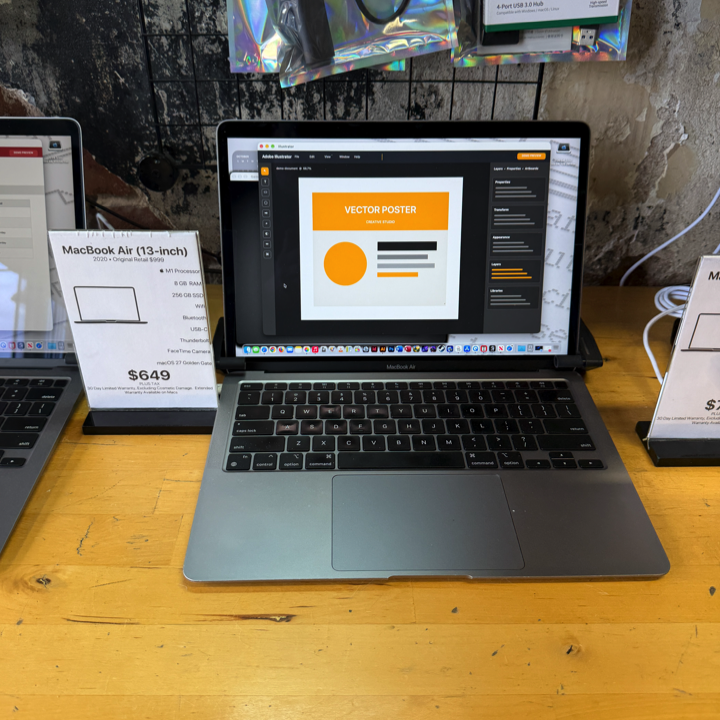
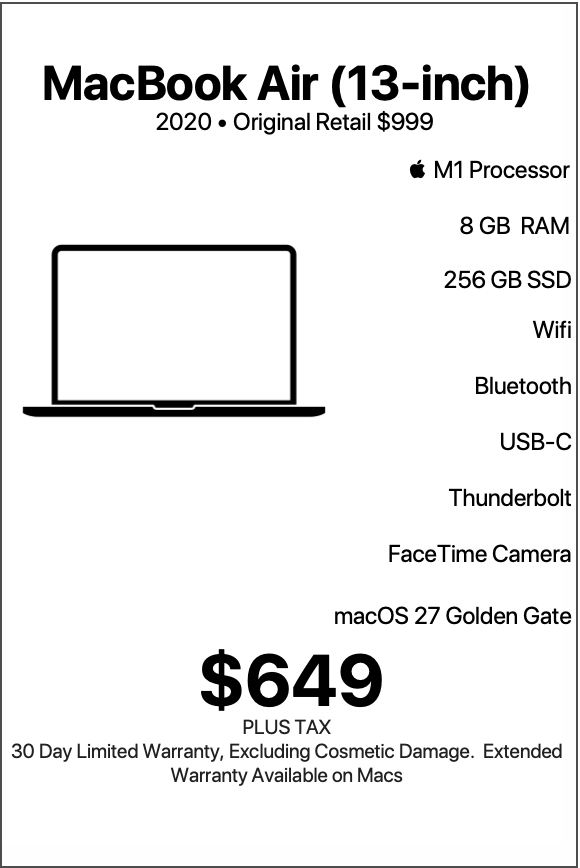
| MacBook Air 13-inch |
|---|
| “Small in size, mighty with M1—this MacBook Air brings big energy to your everyday adventures.“ |
| Who Is Best Suited for the 2020 13-inch MacBook Air M1 with 8 GB RAM and 256 GB SSD? The 2020 13-inch MacBook Air with Apple’s M1 processor represents an excellent combination of everyday performance, portability, efficiency, and value. With Apple’s powerful M1 chip, 8 GB of unified memory, 256 GB of solid-state storage, and a sleek aluminum design, this MacBook Air offers a comfortable and responsive computing experience for students, professionals, families, travelers, and anyone who appreciates a dependable Mac for daily activities. Available from Denver Mac Repair for $649 with warranty, this MacBook Air brings Apple Silicon performance into an attractive price range while delivering the familiar elegance and simplicity that make the MacBook Air such a popular choice. Originally retailing for $999, this MacBook Air offers a compelling opportunity for customers who appreciate Apple’s thoughtful hardware design, macOS integration, and efficient computing technology. Running a version of macOS 27 Golden Gate as configured by Denver Mac Repair, this machine provides a familiar Mac desktop experience alongside the performance advantages of Apple’s M1 architecture. |
LEARN MORE
Who Is Best Suited for the 2020 13-inch MacBook Air M1 with 8 GB RAM and 256 GB SSD? The 2020 13-inch MacBook Air with Apple’s M1 processor represents an excellent combination of everyday performance, portability, efficiency, and value. With Apple’s powerful M1 chip, 8 GB of unified memory, 256 GB of solid-state storage, and a sleek aluminum design, this MacBook Air offers a comfortable and responsive computing experience for students, professionals, families, travelers, and anyone who appreciates a dependable Mac for daily activities. Available from Denver Mac Repair for $649 with warranty, this MacBook Air brings Apple Silicon performance into an attractive price range while delivering the familiar elegance and simplicity that make the MacBook Air such a popular choice. Originally retailing for $999, this MacBook Air offers a compelling opportunity for customers who appreciate Apple’s thoughtful hardware design, macOS integration, and efficient computing technology. Running a version of macOS 27 Golden Gate as configured by Denver Mac Repair, this machine provides a familiar Mac desktop experience alongside the performance advantages of Apple’s M1 architecture. The M1 processor combines CPU processing, graphics capabilities, and unified memory architecture into one efficient system on a chip. This integrated design supports responsive application launches, fluid multitasking, smooth web browsing, and enjoyable everyday computing. The result is a machine that feels comfortable handling the activities that fill a typical day, from checking email and participating in video calls to preparing presentations, organizing photographs, and enjoying streaming entertainment. With its compact 13-inch design, comfortable keyboard, Force Touch trackpad, Touch ID authentication, and two Thunderbolt/USB ports, this MacBook Air also fits naturally into a variety of environments. It moves easily between home, school, office, coffee shop, and travel destinations while maintaining a polished and professional appearance. At Denver Mac Repair, we appreciate Macs that deliver practical value and a great user experience. This M1 MacBook Air brings together those qualities in a package that makes sense for a wide range of customers. Whether it serves as a primary everyday computer, a dedicated school machine, a convenient travel companion, or an additional Mac for the household, this configuration offers plenty of reasons to smile every time the lid opens. An Excellent Choice for Students Students represent one of the strongest matches for this 13-inch MacBook Air. From middle school and high school to college and university programs, students rely on computers for research, writing, communication, organization, and creative assignments. The M1 MacBook Air provides a portable and capable platform for those activities, with an intuitive interface that makes daily academic work feel straightforward. The 13-inch display creates a comfortable workspace for writing essays, reading digital textbooks, reviewing lecture materials, and participating in online classes. Students can keep research articles open in Safari, prepare assignments in Pages or Microsoft Word, manage spreadsheets in Numbers or Excel, and organize coursework through web-based learning platforms. The M1 processor supports quick movement between applications, making it convenient to switch from a research page to a writing document, consult class notes, and communicate with classmates. The 8 GB of unified memory complements typical student workflows involving web browsing, word processing, email, and productivity applications. The 256 GB solid-state drive provides local storage for assignments, presentations, class documents, downloaded readings, and personal files. Students who use iCloud Drive or other cloud storage services can also maintain access to documents across their Apple devices. Portability makes this MacBook Air especially appealing for students who move between classrooms, libraries, study groups, and home. Its slim profile fits comfortably into backpacks and messenger bags, while the efficient M1 architecture supports extended periods of productivity throughout the day. For students who already use an iPhone or iPad, the MacBook Air becomes an especially convenient addition to their technology setup. Apple’s ecosystem features support document synchronization, shared notes, photo access, messaging, and easy transitions between compatible devices. The MacBook Air also supports creative academic work. Students can assemble presentations, edit photographs, create diagrams, organize research materials, and develop multimedia assignments using applications suited to their courses. For $649 with warranty, this configuration offers students an appealing balance of performance, portability, and value. It delivers a genuine Mac experience while leaving room in the technology budget for accessories, software, and other school essentials. Perfect for Everyday Home Computing For many households, a computer serves as the central place for communication, organization, entertainment, and personal projects. The M1 MacBook Air fits beautifully into this role. Everyday activities such as checking email, browsing websites, paying bills, shopping online, managing calendars, and communicating with friends and family feel natural on this machine. The M1 processor keeps common applications responsive, while the solid-state drive contributes to quick startup and application loading. Families can use the MacBook Air to organize digital photographs, maintain household documents, prepare budgets, plan vacations, and manage important records. Apple’s built-in applications provide a useful foundation for these activities, and the Mac App Store offers additional productivity and entertainment options. The 13-inch display offers a pleasant viewing area for online shopping, reading articles, watching videos, and reviewing family photographs. The built-in speakers provide convenient audio for entertainment and communication, while Bluetooth 5.0 supports compatible wireless headphones, speakers, and accessories. The full-size keyboard and Force Touch trackpad also make everyday tasks comfortable. Typing emails, entering information into websites, preparing documents, and navigating macOS all feel intuitive. For households with multiple Apple devices, the MacBook Air can become a convenient organizational hub. Photos, contacts, calendars, reminders, and files can synchronize through iCloud, creating a connected experience between the Mac, iPhone, and iPad. This computer also makes an excellent shared household Mac. Family members can maintain individual user accounts, organize personal documents, and customize their desktop preferences. macOS provides a familiar environment for everyday users and offers accessibility features that support different preferences and abilities. The M1 MacBook Air delivers the type of computing experience that makes routine digital activities enjoyable. It feels approachable for casual users while providing enough flexibility for more involved personal projects. A Smart Fit for Office Professionals Office professionals who spend their days managing documents, email, spreadsheets, presentations, and browser-based services find a capable partner in this MacBook Air. The M1 processor provides responsive performance for everyday productivity applications, including Microsoft Office, Apple’s iWork suite, Google Workspace, and a variety of cloud-based business platforms. The 8 GB of unified memory supports typical office workflows involving several active applications and a practical collection of browser tabs. Professionals can prepare proposals in Word, review financial information in Excel, create presentations in PowerPoint or Keynote, and manage correspondence through Apple Mail or compatible web-based email services. The compact 13-inch design makes this MacBook Air especially useful for people who divide their time between home and office. It fits easily into a work bag and creates a familiar computing environment wherever the workday takes place. Thunderbolt connectivity adds flexibility to a professional workspace. With compatible adapters, docks, and peripherals, the MacBook Air can connect to external displays, storage devices, keyboards, mice, and other office equipment. A home-office setup can include a larger external monitor for spreadsheets and document editing, a full-size keyboard for extended typing sessions, and a wireless mouse for comfortable navigation. At the end of the workday, the MacBook Air returns to its portable form for easy transportation. Touch ID adds another welcome convenience. Fingerprint authentication supports secure access to the Mac and compatible authentication features, helping professionals move efficiently through their daily routines. For independent professionals, administrative staff, consultants, and remote employees, this MacBook Air offers an attractive combination of mobility and productivity. Its Apple Silicon architecture supports efficient everyday computing, while macOS provides a polished platform for communication and organization. At $649 with warranty from Denver Mac Repair, it represents an accessible way to equip a workspace with an Apple Silicon Mac. Ideal for Remote Workers and Hybrid Employees Remote work creates a demand for computers that feel comfortable in different environments. The M1 MacBook Air responds to that demand with a portable design, responsive performance, and convenient connectivity. A remote employee may begin the morning reviewing email at the kitchen table, spend the afternoon working from a dedicated desk, and finish the day preparing documents in another room. The MacBook Air moves naturally between those spaces. Video conferencing applications, messaging platforms, document editors, and web-based collaboration tools form the foundation of many remote workflows. The M1 processor provides a capable platform for these activities, and the MacBook Air’s integrated camera and audio hardware support convenient communication. For employees who spend considerable time in virtual meetings, the MacBook Air can also connect to compatible external webcams, microphones, headphones, and monitors. Its Thunderbolt/USB ports support a variety of desk configurations through appropriate accessories. The fanless design of the M1 MacBook Air contributes to a quiet working environment. Passive cooling allows the machine to operate silently, an especially appealing quality during calls, recorded presentations, and focused work sessions. The compact size also encourages flexibility. Working from a home office, shared workspace, hotel desk, or conference room becomes more convenient with a computer that travels easily. Remote professionals who use cloud-based applications for project management, scheduling, customer communication, and document sharing find this configuration particularly well suited to their daily activities. The combination of 8 GB of memory and 256 GB of storage works especially well when most documents and business resources live in cloud services. This arrangement keeps local storage available for active projects while maintaining convenient access to shared files. For hybrid employees, the M1 MacBook Air provides a consistent computing experience across different workplaces, making it a practical choice for modern professional routines. A Great Computer for Small Business Owners Small business owners often appreciate technology that balances functionality, convenience, and affordability. This M1 MacBook Air delivers that combination in a compact and attractive package. Running a business involves a wide range of digital responsibilities. Owners may prepare invoices, manage customer correspondence, update websites, review sales information, maintain schedules, and organize financial documents throughout the day. The MacBook Air provides a convenient platform for bringing these activities together. Cloud-based accounting applications, customer relationship management platforms, scheduling services, and online storefront dashboards are particularly comfortable matches for this configuration. Business owners can access their essential services through Safari or other compatible browsers while keeping documents and spreadsheets readily available. The 256 GB SSD offers space for business records, marketing materials, correspondence, and working documents. Cloud storage can complement the internal drive by maintaining shared files and synchronized resources across devices. The M1 processor supports responsive performance for typical business applications, helping owners move smoothly between tasks. A business owner can review customer messages, update a spreadsheet, prepare a proposal, and access a scheduling platform during the same working session. Portability also matters for entrepreneurs who work across multiple locations. This MacBook Air travels easily between a storefront, home office, client meeting, and shared workspace. Its aluminum construction creates a polished appearance during meetings and presentations, while the 13-inch display provides a comfortable workspace for reviewing information. Small business owners who use iPhones also benefit from Apple’s integrated ecosystem. Shared calendars, contacts, messages, and documents help create a consistent experience across compatible Apple devices. For entrepreneurs establishing a new business, equipping an additional employee, or creating a dedicated administrative workstation, this MacBook Air offers practical value at $649 with warranty. At Denver Mac Repair, we appreciate computers that help businesses make the most of their technology investment. This M1 MacBook Air represents a useful solution for the administrative, communication, and organizational activities that keep a business moving. Excellent for Writers, Bloggers, and Content Creators Writers often value a computer that creates a comfortable environment for concentration. The M1 MacBook Air offers an inviting workspace for developing ideas, drafting articles, preparing manuscripts, and organizing creative projects. The full-size backlit Magic Keyboard provides a familiar typing experience for long writing sessions. Its comfortable key layout makes it suitable for composing emails, writing reports, preparing academic papers, and developing longer creative works. The 13-inch Retina display presents text with sharp detail, making it pleasant to review documents, edit paragraphs, and read research materials. Apple’s display technology supports crisp typography and comfortable everyday viewing. Writers can use applications such as Pages, Microsoft Word, Scrivener, Notes, and compatible web-based writing platforms to develop and organize their work. The M1 processor supports responsive editing and convenient movement between research resources and writing applications. Bloggers can manage publishing platforms, prepare website content, organize photographs, and review analytics through their preferred browser. The MacBook Air also supports everyday image preparation and document formatting, allowing writers to combine text with supporting visual materials. For authors working on longer manuscripts, the 256 GB SSD provides space for drafts, reference materials, outlines, and related documents. iCloud Drive can synchronize projects between compatible Apple devices, helping writers continue their work from different locations. The fanless design creates an especially appealing environment for writing. The MacBook Air operates silently, allowing the gentle sounds of a coffee shop, library, or home office to become the background for a productive session. Portability also supports creativity. Inspiration can arrive during a trip, between classes, at a café, or while relaxing outdoors. The MacBook Air’s compact dimensions make it convenient to carry along and begin writing whenever an idea appears. For journalists, students, novelists, bloggers, copywriters, and anyone who enjoys putting words on a page, this configuration offers a comfortable and practical creative companion. A Wonderful Choice for Teachers and Educators Teachers and educators depend on computers for lesson planning, communication, classroom management, and preparing educational materials. The M1 MacBook Air offers an accessible and portable solution for these responsibilities. Educators can prepare lesson plans in Pages or Word, create classroom presentations in Keynote or PowerPoint, organize student information in spreadsheets, and manage schedules through calendar applications. Web-based educational platforms also fit naturally into the MacBook Air’s everyday workflow. Teachers can access learning management systems, review submitted assignments, distribute materials, and communicate with students through compatible services. The M1 processor supports responsive everyday productivity, making it convenient to work with educational documents and online resources. The 8 GB of unified memory provides a practical foundation for common classroom preparation tasks. The MacBook Air’s portability is especially useful for teachers who move between classrooms, offices, and home. Its compact design fits easily into a bag alongside books, notebooks, and teaching supplies. Thunderbolt connectivity allows the machine to participate in classroom presentation setups through compatible adapters and display equipment. Educators can connect to supported monitors or projectors to share instructional materials. The built-in camera and microphones also support virtual office hours, remote instruction, and professional development meetings. For educators who use an iPad, Apple’s ecosystem provides additional flexibility. Documents, notes, and teaching resources can synchronize through iCloud, allowing classroom preparation to continue across devices. The 256 GB SSD provides room for presentations, lesson plans, worksheets, reference materials, and other teaching resources. Cloud storage adds flexibility for managing shared classroom documents. For teachers, tutors, instructors, and educational support professionals, this M1 MacBook Air offers a convenient balance of portability, productivity, and affordability. Well Suited for Retirees and Casual Computer Users Retirees and casual computer users often appreciate a machine that emphasizes convenience, familiar controls, and enjoyable everyday computing. This MacBook Air provides exactly that kind of experience. Activities such as communicating with family, browsing the internet, organizing photographs, managing personal documents, and watching videos feel natural on the MacBook Air. The Retina display presents photographs, websites, and documents with crisp detail. macOS also includes accessibility features that allow users to customize text size, display appearance, pointer behavior, and other interface settings according to their preferences. The full-size keyboard provides a comfortable way to write messages, prepare letters, and complete online forms. The Force Touch trackpad supports familiar gestures for scrolling, navigating, and interacting with applications. Touch ID adds convenience by allowing fingerprint authentication for supported tasks. This feature can make everyday interactions feel more streamlined. For people who enjoy staying connected with friends and family, the MacBook Air supports email, messaging, and video communication through compatible applications. Photographs and family memories also find a welcoming home on this machine. Apple’s Photos application provides tools for organizing albums, browsing images, and enjoying digital collections. The 256 GB SSD offers space for personal documents and selected photo libraries, while iCloud Photos provides additional options for managing larger collections. Retirees who enjoy traveling may particularly appreciate the MacBook Air’s portable design. It fits comfortably into luggage and offers access to familiar applications while visiting family, taking vacations, or spending time away from home. For customers who appreciate personalized assistance, Denver Mac Repair can help with common Mac services such as data transfers, account setup, software configuration, and general Mac support. This M1 MacBook Air provides an approachable and capable computer for anyone who enjoys staying connected, organized, and entertained. A Capable Machine for Photography Enthusiasts Photography enthusiasts who enjoy organizing, reviewing, and editing photographs find several appealing qualities in the M1 MacBook Air. The 13.3-inch Retina display features a native resolution of 2560 by 1600 pixels, P3 wide color, and True Tone technology. These display characteristics contribute to sharp image presentation and rich visual detail.  Apple Support (IE) Apple’s integrated graphics and M1 processor provide a capable platform for everyday photo management and creative adjustments. Users can organize image libraries, crop photographs, adjust exposure, refine colors, and prepare pictures for sharing. Apple Photos offers a convenient environment for organizing personal photography collections. Compatible photo editing applications provide additional tools for enthusiasts who enjoy exploring image adjustments and creative effects. The 8 GB of unified memory suits casual photography workflows, particularly projects involving selected images and everyday editing. The 256 GB SSD offers local storage for active collections, with compatible external drives providing additional capacity for larger photo archives. The two Thunderbolt/USB ports also support connections to compatible external storage devices and card readers through appropriate adapters. For photographers who enjoy traveling, the MacBook Air provides a convenient place to review images after a day of shooting. Its compact design makes it easy to carry alongside camera equipment. The M1 architecture combines CPU and GPU capabilities within a unified system, helping supported creative applications operate efficiently. Photography enthusiasts can use the MacBook Air to prepare family albums, edit vacation photographs, organize portfolios, and share favorite images with friends and clients. For hobbyists who value portability and a high-quality display, this configuration creates an enjoyable environment for everyday photographic creativity. Great for Social Media Management Social media management involves writing, image preparation, scheduling, communication, and monitoring online activity. The M1 MacBook Air provides a convenient platform for bringing these responsibilities together. Individuals managing personal accounts can use the machine to organize photographs, prepare captions, review content, and interact with online communities. Small business owners can use compatible web-based platforms to manage social media pages, review engagement statistics, prepare promotional graphics, and coordinate publishing schedules. The M1 processor supports responsive web browsing and everyday creative applications, while the 8 GB of unified memory complements practical social media workflows. The Retina display makes it pleasant to review images, prepare graphics, and organize visual content. The full-size keyboard provides a comfortable environment for writing captions, descriptions, announcements, and longer posts. The 256 GB SSD provides space for active marketing materials, images, and documents. Cloud-based media libraries offer additional flexibility for teams that collaborate on shared content. For users who create short videos, compatible editing applications support assembling clips, adding titles, and preparing straightforward social media projects. The MacBook Air’s portability also makes it convenient for content creators who work from different locations. A social media manager can prepare posts at a desk, review updates while traveling, and communicate with collaborators throughout the day. For entrepreneurs, community managers, bloggers, and individuals developing an online presence, this M1 MacBook Air offers a practical foundation for daily content management. An Appealing Choice for Beginning Graphic Designers Beginning graphic designers and creative students can enjoy exploring visual design on this M1 MacBook Air. The Retina display provides a sharp workspace for working with layouts, illustrations, typography, and digital images. Its P3 wide color capability supports vibrant visual presentation, making it an attractive display for creative exploration. The M1 processor and integrated Apple GPU provide a useful foundation for entry-level design projects. Users can create posters, prepare social media graphics, design invitations, assemble presentations, and explore digital illustration using compatible applications. The 8 GB of unified memory suits introductory creative workflows and projects with manageable document sizes. The 256 GB SSD offers space for applications, working files, exported graphics, and personal design collections. Design students can use the MacBook Air to develop portfolios, research visual references, prepare class assignments, and present completed projects. The Force Touch trackpad supports precise cursor movement and Multi-Touch gestures, creating a comfortable way to navigate creative applications. Compatible external mice and drawing tablets can also expand the available input options. For designers who enjoy working in different environments, portability is another advantage. The MacBook Air travels easily between classrooms, studios, libraries, and home workspaces. Cloud storage and external drives can complement the internal SSD by providing convenient access to larger collections of creative assets. This configuration offers an approachable introduction to digital design and gives aspiring creatives a polished Mac platform for developing their skills. A Practical Computer for Everyday Video Editing Video editing enthusiasts who enjoy creating family movies, school projects, vacation highlights, and social media clips can make good use of the M1 MacBook Air. Apple’s M1 processor includes hardware designed to support efficient media processing, making the MacBook Air an appealing choice for straightforward video projects. Applications such as iMovie provide an approachable environment for assembling clips, arranging scenes, adding transitions, incorporating music, and preparing completed videos. The 13-inch Retina display offers a clear view of footage and editing controls, while the Force Touch trackpad supports convenient timeline navigation. The 8 GB of unified memory works well with modest editing projects, and the 256 GB SSD provides space for selected source clips and active project files. External solid-state drives can add convenient working storage for video collections and exported projects. Thunderbolt connectivity supports compatible high-speed storage accessories, helping users organize their media workflows. Students can use the MacBook Air to prepare video assignments, while families can assemble vacation memories, birthday celebrations, and personal highlights. Small business owners may also appreciate the ability to prepare simple promotional videos, product demonstrations, and social media clips. The fanless design keeps the machine quiet during creative sessions, creating a pleasant working environment. For everyday video enthusiasts, this MacBook Air offers a compact and accessible platform for turning recordings into polished personal projects. An Excellent Travel Companion Travelers often appreciate a computer that combines portability, useful performance, and efficient power consumption. The M1 MacBook Air brings those qualities together in an elegant aluminum enclosure. Weighing approximately 2.8 pounds, the MacBook Air fits comfortably into backpacks, carry-on luggage, and travel bags. Its slim design makes it easy to transport between airports, hotels, conference centers, and vacation destinations. The M1 processor emphasizes energy efficiency, making this model particularly appealing for mobile computing. Apple’s original specifications describe up to 15 hours of wireless web browsing and up to 18 hours of Apple TV app movie playback under its testing conditions. Actual battery performance varies with battery condition, software, and usage. Travelers can use the MacBook Air to manage reservations, organize itineraries, review maps, communicate with friends and family, and access important documents. The Retina display makes it pleasant to watch movies, review photographs, and browse travel information during downtime. For business travelers, the MacBook Air provides access to presentations, email, spreadsheets, and compatible conferencing platforms. The 256 GB SSD provides local storage for essential travel documents, downloaded entertainment, and selected photographs. Wi-Fi connectivity supports access to compatible wireless networks in hotels, airports, and other travel environments. Bluetooth 5.0 allows pairing with compatible headphones, mice, and other accessories. The machine also works beautifully for people who combine travel with creative projects. Writers can record their experiences, photographers can review images, and students can continue coursework while away from home. At $649 with warranty, this MacBook Air makes an attractive addition to a travel setup for people who appreciate the convenience of carrying a full macOS computer. A Great Secondary Mac for Apple Enthusiasts Apple enthusiasts who already own a desktop Mac or another primary computer may find this MacBook Air especially useful as a secondary machine. A dedicated portable Mac adds flexibility to an existing technology setup. Users can keep a desktop computer in a home office while using the MacBook Air for travel, meetings, casual browsing, and everyday activities elsewhere. iCloud helps create continuity between compatible Apple devices. Documents, calendars, contacts, notes, and other synchronized information can remain accessible across the ecosystem. A user who begins writing a document on an iMac can continue editing it on the MacBook Air through supported cloud synchronization. Photographs and other personal content can also appear across compatible devices. The MacBook Air provides an additional place to access email, manage household records, prepare presentations, and handle personal projects. For households with several Apple users, the machine can serve as a shared portable computer. Individual macOS accounts allow family members to maintain their own settings and personal files. The M1 processor gives this secondary Mac substantial everyday capability, allowing it to function as a convenient companion for productivity and entertainment. Its compact design also makes it an appealing computer for a guest room, kitchen workspace, or vacation property. For Apple enthusiasts who appreciate having the right Mac available in different locations, this configuration offers a practical way to expand their computing flexibility. A Comfortable Introduction to macOS People exploring the Mac ecosystem for the first time can find a welcoming introduction in the M1 MacBook Air. macOS offers a graphical desktop environment with familiar concepts such as windows, folders, applications, menus, and a centralized file management system. The Finder provides access to files and folders, while the Dock creates convenient shortcuts to frequently used applications. Built-in applications such as Safari, Mail, Photos, Calendar, Notes, and Preview provide useful everyday tools immediately within the macOS environment. The MacBook Air’s Force Touch trackpad supports gestures that make navigating the desktop intuitive. Users can scroll through documents, move between applications, and interact with windows through familiar touch movements. The full-size keyboard provides a comfortable typing experience, while Touch ID offers convenient authentication for supported functions. New Mac users can also explore Apple’s broader ecosystem. People who already use an iPhone or iPad may appreciate the familiar Apple design language and integration between compatible devices. The M1 processor contributes to a responsive everyday experience, making it pleasant to explore applications, organize files, and become familiar with macOS. The 256 GB SSD provides room for essential applications and personal documents, while cloud storage offers convenient options for synchronizing information. Denver Mac Repair can also assist customers with services such as transferring data, configuring accounts, and becoming familiar with their Mac. For anyone interested in entering the Apple computer ecosystem, this MacBook Air offers a capable and accessible starting point. Apple Silicon Performance for Everyday Productivity One of the most appealing features of this MacBook Air is Apple’s M1 processor. The M1 represents Apple’s integrated approach to Mac computing, combining processing, graphics, memory architecture, and specialized technologies within a system on a chip. Its eight-core CPU includes four performance cores and four efficiency cores. This arrangement allows the system to balance responsive processing with efficient operation across everyday workloads. For typical users, the benefits appear in familiar activities. Applications launch promptly, web pages respond smoothly, and documents feel comfortable to edit. The M1 processor supports common productivity applications, multimedia playback, communication tools, and everyday creative software. Apple’s unified memory architecture also plays an important role. The 8 GB of memory works within the integrated system design, allowing compatible processing components to access shared memory resources efficiently. This arrangement supports a responsive experience for common workloads involving email, document editing, browsing, and everyday media applications. The integrated Apple GPU provides graphics processing for macOS interface effects, video playback, image presentation, and compatible creative applications. The M1 also includes a Neural Engine that supports machine-learning operations in compatible software. Together, these technologies create a balanced computing platform that feels especially well matched to everyday personal and professional tasks. The MacBook Air’s fanless construction adds another appealing quality. The computer operates silently, making it particularly comfortable in classrooms, libraries, offices, and quiet home environments. For customers who appreciate a Mac that feels responsive, efficient, and easy to use, the M1 processor remains one of this machine’s defining attractions. The Convenience of 8 GB Unified Memory Memory plays an important role in how a computer manages active applications and everyday tasks. This MacBook Air includes 8 GB of unified memory, providing a practical configuration for common computing activities. For students, this memory capacity supports familiar workflows involving word processing, online research, email, and presentations. Home users can enjoy browsing, shopping, streaming, messaging, and personal document management. Office professionals can work with spreadsheets, correspondence, scheduling tools, and browser-based services. The M1 architecture uses a unified memory design, allowing the CPU and GPU to share memory within the integrated system. This approach contributes to efficient communication between processing components and complements the machine’s everyday performance. The 8 GB configuration is especially appealing for users who maintain focused workflows and rely on cloud services for much of their activity. A writer working in a document editor, a student reviewing coursework, or a business owner managing online services can enjoy a comfortable computing experience. macOS also includes memory management technologies that help organize available system resources as applications operate. For customers whose computing activities center on communication, productivity, browsing, and entertainment, 8 GB of unified memory offers a useful balance of capability and value. Fast and Convenient 256 GB Solid-State Storage Storage is another important part of the MacBook Air experience. This configuration includes a 256 GB solid-state drive, providing fast access to macOS, applications, documents, and personal files. Solid-state storage contributes to responsive startup, quick application launches, and convenient file access. For everyday users, the internal SSD provides space for common productivity applications, school documents, photographs, music, and selected personal projects. Students can organize assignments and class materials, while professionals can maintain working documents and business resources. The 256 GB capacity also works particularly well alongside cloud storage services. iCloud Drive allows compatible files to synchronize between Apple devices, creating convenient access to documents from different locations. Users with larger media collections can complement the internal SSD with compatible external storage devices. The MacBook Air’s Thunderbolt/USB connectivity supports a variety of external drives and storage accessories. For photographers, external storage can provide room for larger image libraries. For families, it can help organize digital archives. For professionals, it can provide convenient space for project materials and backups. The internal SSD serves as a responsive home for macOS and frequently used applications, while additional storage options offer flexibility as personal collections grow. For everyday computing, this arrangement creates a practical balance between local performance and storage convenience. A Beautiful Retina Display for Work and Entertainment The MacBook Air’s 13.3-inch Retina display is another major part of its appeal. With a native resolution of 2560 by 1600 pixels, the display presents text, photographs, graphics, and interface elements with crisp detail. The screen also supports P3 wide color and True Tone technology, which adjusts the display’s appearance in response to surrounding lighting conditions. These features make the MacBook Air pleasant to use for a wide variety of activities. Students can read assignments and review presentations. Writers can enjoy sharp typography while editing manuscripts. Photographers can examine images with rich color reproduction. Home users can watch streaming entertainment, browse family photographs, and explore websites on a detailed display. The 13-inch size also contributes to portability. It creates a useful balance between screen space and compact dimensions, making the machine comfortable to use at desks, kitchen tables, cafés, and travel destinations. For customers who prefer a larger workspace, the MacBook Air supports a compatible external display through its Thunderbolt/USB connectivity. This flexibility allows the machine to function as a compact portable computer and participate in a more spacious desktop arrangement. The Retina display helps make everyday computing feel polished, whether the activity involves work, study, entertainment, or creative exploration. Comfortable Keyboard, Force Touch Trackpad, and Touch ID A great laptop experience depends on the quality of its everyday controls. The M1 MacBook Air includes a backlit Magic Keyboard, a spacious Force Touch trackpad, and an integrated Touch ID sensor. Apple’s standard M1 MacBook Air keyboard features 78 U.S. keys, including 12 function keys and four arrow keys. Touch ID sits at the upper-right area of the keyboard. The keyboard creates a comfortable environment for writing, messaging, research, and document preparation. Backlighting adds convenience in a variety of lighting conditions, making the keyboard pleasant to use in classrooms, offices, and home environments. The Force Touch trackpad supports precise cursor movement and Multi-Touch gestures. Users can scroll through webpages, navigate documents, switch between applications, and interact with macOS using natural finger movements. Force Touch technology also supports pressure-sensitive interactions in compatible applications. Touch ID brings another level of convenience to the experience. Fingerprint authentication allows supported actions to feel quick and familiar. For students, professionals, and home users alike, these input features contribute to a polished daily workflow. The combination of keyboard, trackpad, and Touch ID reflects Apple’s attention to the small interactions that make a computer enjoyable to use. Flexible Thunderbolt and Wireless Connectivity Connectivity helps determine how comfortably a laptop fits into a larger technology setup. This MacBook Air includes two Thunderbolt/USB 4 ports that support Thunderbolt 3 transfer speeds up to 40 Gbps and USB 3.1 Gen 2 transfer speeds up to 10 Gbps with compatible equipment. These connections support a variety of accessories, including external storage devices, display adapters, docking stations, and compatible peripherals. For students, a USB-C adapter can provide access to classroom presentation equipment and external drives. Office professionals can use compatible docking accessories to connect additional desktop equipment. Photographers and content creators can attach compatible external storage devices to organize media projects. The M1 MacBook Air also supports one external display at up to 6K resolution and 60 Hz, alongside its built-in display. Wireless connectivity adds everyday convenience. The model includes Wi-Fi 6 with compatibility for 802.11ac networks, along with Bluetooth 5.0. Wi-Fi provides access to compatible home, school, office, and public networks, while Bluetooth supports wireless accessories such as headphones, speakers, keyboards, and mice. These connectivity options allow the MacBook Air to adapt to different working environments while maintaining its compact design. Enjoying the macOS Experience Running the advertised version of macOS 27 Golden Gate, this MacBook Air is presented as a convenient platform for familiar Mac applications and everyday workflows. macOS provides a polished desktop environment built around productivity, communication, file management, and creative applications. The Finder helps users organize documents, the Dock provides access to frequently used applications, and Mission Control offers a convenient way to navigate open windows and desktops. Safari supports web browsing, while Mail, Calendar, Notes, Reminders, and other applications help users stay organized. Apple’s ecosystem also provides convenient integration with compatible iPhones and iPads through services such as iCloud, AirDrop, and Continuity features. For students, macOS offers an approachable environment for coursework and research. For professionals, it supports familiar office applications, online services, and communication tools. For creative users, it provides access to a broad range of photography, design, writing, and media applications. For home users, macOS offers a comfortable platform for entertainment, communication, and personal organization. The M1 processor complements this environment by providing efficient processing and responsive everyday performance. The result is a Mac experience that feels familiar, capable, and enjoyable across a wide range of activities. An Attractive Value at $649 with Warranty Value is about finding the right combination of performance, features, quality, and price. This 2020 13-inch MacBook Air originally retails for $999 and is offered by Denver Mac Repair for $649 with warranty. That price brings together Apple’s M1 processor, 8 GB of unified memory, 256 GB of solid-state storage, a Retina display, a backlit keyboard, Force Touch trackpad, Touch ID, and Thunderbolt connectivity. For students, the machine provides a practical computer for academic work. For professionals, it offers a portable productivity platform. For families, it creates a convenient home computer. For travelers, it provides a compact companion for communication and entertainment. For writers and creative enthusiasts, it offers a comfortable workspace for developing projects. The included warranty adds value to the purchase experience and gives customers an additional reason to feel confident in their choice. Denver Mac Repair also provides a local resource for customers who appreciate knowledgeable Mac service and support. Choosing a previously owned Mac can also contribute to more sustainable technology use. Extending the useful life of existing computers helps make the most of the materials, manufacturing resources, and engineering already invested in each machine. For customers who appreciate thoughtful purchasing decisions, this M1 MacBook Air combines everyday functionality with an appealing opportunity to give a capable computer another productive chapter. Why Buy from Denver Mac Repair? Denver Mac Repair brings a practical, customer-focused approach to Apple technology. Our team understands that customers choose computers for different reasons. A student preparing for college has different priorities from a business owner managing daily operations, and a frequent traveler values different features from a family organizing photographs. Finding the right Mac involves understanding those priorities and matching them with a machine that makes sense. This M1 MacBook Air is particularly appealing because it serves so many everyday computing needs. Its processor provides efficient performance, its display offers sharp visuals, and its compact design makes it comfortable to carry. The keyboard and trackpad create an enjoyable everyday interface, while Touch ID and Apple’s integrated ecosystem add convenient features. Denver Mac Repair’s experience with Apple computers also gives customers access to knowledgeable assistance with common services such as software configuration, data migration, storage management, and general Mac maintenance. For customers moving from another Mac, transferring personal files and becoming familiar with the new machine can be part of a smooth transition. For people purchasing their first Mac, helpful guidance can make the experience especially welcoming. The included warranty further supports the value of this $649 offering. At Denver Mac Repair, we enjoy helping customers find technology that fits their lives. This MacBook Air offers a strong combination of portability, performance, and everyday usability, making it an appealing option for a broad range of Mac users. Who Gets the Most from This MacBook Air? The 2020 13-inch MacBook Air M1 with 8 GB of unified memory and 256 GB of solid-state storage is particularly well suited to people who value portability, responsive everyday performance, and an approachable Mac experience. Students benefit from a lightweight computer for coursework, research, writing, and presentations. Office professionals enjoy a convenient platform for documents, email, spreadsheets, and online services. Remote workers appreciate a quiet, portable machine that moves comfortably between different workspaces. Small business owners gain a practical tool for communication, scheduling, bookkeeping, and administrative activities. Writers and bloggers enjoy the comfortable keyboard, sharp display, and distraction-free fanless design. Teachers and educators benefit from an adaptable computer for lesson planning, classroom preparation, and communication. Families and casual users find a welcoming environment for browsing, shopping, organizing photographs, and enjoying entertainment. Travelers appreciate the compact aluminum design and energy-efficient Apple Silicon architecture. Photography enthusiasts and beginning creative users can explore image editing, graphic design, and straightforward multimedia projects. Apple enthusiasts gain a useful secondary Mac that fits naturally into an existing ecosystem of compatible devices. Across all these activities, the MacBook Air provides a balanced combination of useful features. Its M1 processor supports everyday productivity, the 8 GB of unified memory complements common application workflows, and the 256 GB SSD provides responsive local storage. The Retina display brings clarity to documents and images, while the Magic Keyboard and Force Touch trackpad make daily interaction comfortable. Touch ID adds convenience, Thunderbolt connectivity expands peripheral options, and macOS provides a familiar foundation for work and entertainment. At $649 with warranty from Denver Mac Repair, this MacBook Air offers an appealing way to enjoy Apple Silicon computing at a practical price. Whether it becomes a student’s everyday companion, a professional’s portable office, a family’s shared computer, or a traveler’s connection to the digital world, this 13-inch MacBook Air brings plenty of capability to the table. Compact, capable, efficient, and unmistakably Mac, this M1 MacBook Air is ready to earn its place in the daily routine. |
| *Patch is not a natively supported macOS, performance of third party is not guaranteed. Machine can be reverted back to a native macOS at no cost. |
| Denver Mac Repair Warranty 30 days from purchase, excludes cosmetic damage, Extended Warranty available. |
Check Out these other Available Macs and Apple devices!
- MacBook Air 13-inch “Big M2 energy in a sleek little MacBook Air—fast, featherlight, and ready to make your workload jealous.”

- MacBook Air 13-inch “Small in size, mighty with M1—this MacBook Air brings big energy to your everyday adventures.”
- MacBook Air 13-inch “Light on its feet, loaded with storage, and powered by M1 magic.”
- MacBook Pro 16-inch “M1 Pro power, 16 GPU cores, and 16 inches of “go ahead, open another app.””
- MacBook Pro 16-inch “Serious performance. Seriously good deal.”
- iPhone Air “Thin enough to disappear in your pocket. Powerful enough to steal all your attention.”
- Mac mini w/23-inch Display “Less chaos. More aluminum.”
- DENVER MAC REPAIR IS PURCHASING APPLE DEVICES!!




Denver Mac Repair is not associated with Affirm, see app (click logo above) for terms, conditions and detail.
Also visit Boulder Mac Repair – 2525 Broadway, Boulder CO 80304
Boulder Mac Repair – Macs for Sale
See shop for current availability. Apple equipment sales are final.
Any errors are wholly unintentional and we apologize if erroneous information is reflected in merchandise price, item availability, or in any way affects your individual order.
Denver Mac Repair reserves the right to correct any errors, inaccuracies or omissions and to change or update information at any time without prior notice.
Denver Mac Repair reserves the right to cancel any promotion, or offer at any time and for any reason.


MacBook Air 13-inch "Small in size, mighty with M1—this MacBook Air brings big energy to your everyday adventures." | Denver Mac Repair
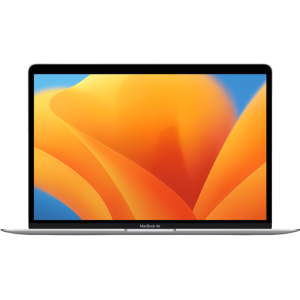
MacBook Air 13-inch "Small in size, mighty with M1—this MacBook Air brings big energy to your everyday adventures." -
Product SKU: FVFJ2U0YQ6L4
Product Brand: Apple
Product Currency: USD
Product Price: 649
Price Valid Until: 2027-12-31
Product In-Stock: InStock


