
iMac 21.5-inch $299
iMac14,3
| iMac 21.5-inch |
|---|
| “Proof that great Macs don’t retire—they just find new missions.” |
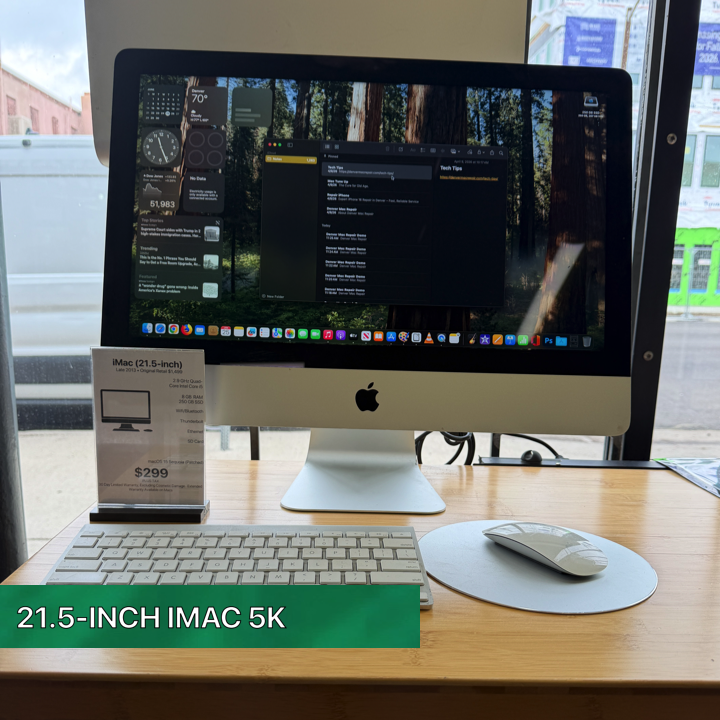
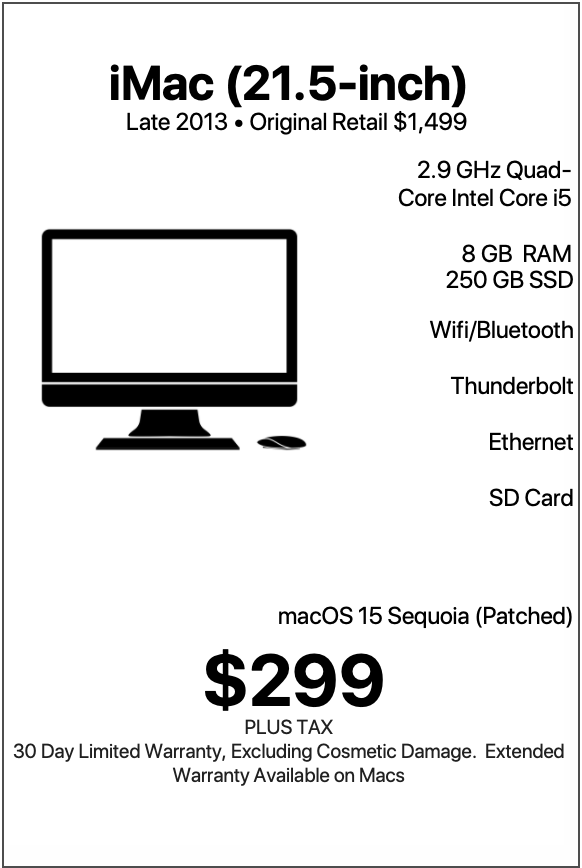
| At $299 with a warranty, a 2013 21.5-inch iMac running a patched version of macOS 15 Sequoia represents one of the most affordable ways to enter the Mac ecosystem while still enjoying a modern desktop computing experience. Originally sold for approximately $1,499, this machine delivers a remarkable amount of capability for a fraction of its original price. Equipped with a 2.9 GHz Quad-Core Intel Core i5 processor, 8 GB of RAM, a fast 250 GB Solid State Drive, NVIDIA GeForce GT 750M graphics, built-in FaceTime camera, 802.11ac Wi-Fi, Bluetooth 4.0, USB 3.0 connectivity, Thunderbolt ports, Apple Magic Mouse, and Apple Wireless Keyboard, this iMac continues to be a practical and enjoyable computer for a wide range of users. |
LEARN MORE
| When upgraded with a fast SSD and running macOS 15 Sequoia through the Denver Mac Repair Patch, this iMac feels surprisingly modern and capable. Rather than focusing on what it cannot do, it is more useful to examine the many people who can genuinely benefit from owning it. The Budget-Conscious Mac User Perhaps the most obvious audience for this machine is someone who wants a Mac without spending thousands of dollars. Apple’s newest iMac models are outstanding computers, but they typically start at several times the cost of this machine. For someone who primarily needs a reliable desktop computer for everyday tasks, spending over a thousand dollars may not make sense. At $299, this iMac provides: A complete desktop setup Large built-in display Apple keyboard Apple mouse Modern web browsing Video calling capabilities Office productivity Email management Photo organization Many users simply need a dependable computer for daily life. They do not require workstation-class performance or the latest hardware innovations. This iMac fills that role exceptionally well. First-Time Mac Owners Many people are curious about macOS but hesitate to spend premium prices on a new Mac. This iMac provides an inexpensive entry point into Apple’s ecosystem. New Mac users can learn: macOS navigation Finder organization Safari browsing iCloud synchronization Photos management FaceTime communication Apple Mail Calendar integration Notes Reminders For someone transitioning from Windows, this machine offers a comfortable way to explore the Mac experience without making a large financial commitment. The all-in-one design also eliminates the complexity often associated with desktop setups. Everything is integrated into a single elegant machine. Students Students frequently need a computer that can handle a broad range of academic tasks. This iMac is particularly well-suited for: High school students Community college students Undergraduate students Adult learners Online students Continuing education participants Students can comfortably use: Microsoft Office Apple Pages Apple Numbers Apple Keynote Google Docs Canvas Blackboard Moodle Zoom Google Meet Research databases The 21.5-inch display provides plenty of screen space for multitasking between research materials and writing assignments. The SSD ensures quick startup times, helping students get to work immediately rather than waiting for a computer to load. Families Many households need a shared family computer. This iMac excels as a family workstation. Family members can use it for: Homework Online shopping Family budgeting Printing documents Recipe management Travel planning Video calls with relatives Streaming media Organizing family photos The large display allows multiple family members to gather around the screen comfortably. Because the machine is stationary, it naturally becomes a central household computer that everyone can access. Home Office Users Not every home office requires cutting-edge computing power. Many professionals spend their days working with: Documents Web applications Scheduling software Customer management systems Cloud platforms For these users, the 2013 iMac remains highly capable. The quad-core processor handles everyday productivity tasks with ease. The SSD keeps applications responsive. The large display provides plenty of workspace for multiple windows. Whether managing appointments, creating invoices, or communicating with customers, this machine performs admirably. Remote Workers Remote work has become a permanent part of modern life. Many remote positions revolve around: Video meetings Document collaboration Browser-based software Email communication Project management platforms This iMac provides an excellent remote work environment. The built-in FaceTime camera makes video conferencing simple. Wi-Fi connectivity keeps users connected. The spacious display improves productivity during long workdays. Popular platforms such as: Zoom Microsoft Teams Slack Google Workspace Trello Asana run smoothly on this configuration. Writers Writers rarely need extreme computing power. Instead, they benefit from: Comfortable keyboards Large displays Quiet operation Stable software This iMac checks every box. It is ideal for: Novelists Journalists Bloggers Technical writers Students Screenwriters Content creators The large display allows writers to view lengthy documents comfortably. The Apple Wireless Keyboard offers an enjoyable typing experience. Many authors could write entire books on this machine without ever feeling limited. Small Business Owners Small businesses often need reliable computers while keeping costs under control. This iMac works exceptionally well for: Retail stores Service businesses Consultants Independent contractors Repair shops Home-based businesses Common business tasks include: Accounting Customer communication Scheduling Inventory management Marketing Social media management The machine’s reliability and low purchase price make it a strong value proposition for entrepreneurs. Social Media Managers Social media management typically relies more on organization than raw computing horsepower. Users managing: X TikTok planning can work effectively on this iMac. The large screen makes content scheduling particularly comfortable. Applications such as: Canva Buffer Hootsuite Meta Business Suite run effectively in modern browsers. Online Shoppers Many people simply want a comfortable desktop computer for internet use. This machine is excellent for: Online shopping Banking Bill payment Travel booking Research Streaming The SSD provides fast page loading and quick application launches. The large screen makes browsing significantly more enjoyable than using a phone. Seniors Older adults often appreciate computers that are: Easy to see Easy to use Reliable Comfortable The 21.5-inch display offers a substantial viewing area. macOS provides a clean, intuitive interface. The all-in-one design reduces cable clutter and confusion. Seniors can use the machine for: FaceTime calls Family photos Online shopping News reading Medical portals The large display is particularly beneficial for users who prefer larger text and icons. Grandparents Keeping in Touch One of the strongest uses for this iMac is staying connected with family. Grandparents can enjoy: FaceTime Photos Shared family albums Messaging The built-in camera and microphone simplify communication. A large screen makes video conversations feel more personal and immersive. Many grandparents would find this computer perfect for maintaining family connections. Photo Enthusiasts The NVIDIA GeForce GT 750M provides useful graphics acceleration. Photo enthusiasts can comfortably use: Apple Photos Adobe Lightroom Pixelmator Affinity Photo for organizing and editing photo collections. The SSD dramatically improves the responsiveness of photo libraries. Family photographers and hobbyists will appreciate the machine’s capabilities. Digital Scrapbookers Creative hobbyists often spend hours working with: Photos Layouts Family history projects Memory books The large display makes these activities enjoyable. Digital scrapbooking applications benefit from the screen size and responsive SSD. This machine can become the centerpiece of countless creative projects. Genealogy Researchers Family history enthusiasts often maintain extensive databases and archives. This iMac works wonderfully for: Ancestry research Historical records Family trees Document organization Photo archives The large display allows multiple research windows to remain visible simultaneously. Casual Gamers The NVIDIA GeForce GT 750M adds another dimension to this machine. Many casual and classic Mac games run very well. Users can enjoy: Strategy games Puzzle games Indie titles Retro gaming Educational games The dedicated graphics hardware offers capabilities beyond what many entry-level systems provided during its era. Streaming Enthusiasts Many households use a desktop computer as an entertainment center. This iMac is excellent for: YouTube Netflix Hulu Disney+ Apple TV+ Music streaming The display offers a comfortable viewing experience for extended sessions. YouTube Viewers A significant percentage of users primarily consume content online. This iMac handles: Educational videos Tutorials Podcasts Livestreams Entertainment channels with ease. The large screen improves the viewing experience compared to laptops and tablets. Podcast Listeners Podcast fans can use the machine for: Listening Managing subscriptions Researching episodes Following creators The built-in speakers provide a pleasant listening experience for everyday use. Hobby Creators Creative hobbies often benefit from a dedicated desktop computer. This machine is ideal for: Blogging Craft design Family newsletters Digital artwork Community projects The combination of a large display and responsive SSD supports a wide variety of creative pursuits. Teachers Educators frequently need dependable computers for: Lesson planning Research Presentations Student communication Online learning platforms This iMac performs these tasks comfortably. The display size is particularly valuable when preparing instructional materials. Tutors Private tutors often use: Video conferencing Shared documents Educational resources Presentation tools The iMac’s large screen helps create an effective teaching environment. Churches and Nonprofits Organizations with limited technology budgets can benefit significantly from this machine. Uses include: Administrative work Volunteer coordination Financial management Presentation creation Communication At $299, it allows organizations to stretch technology budgets much further. Reception Desks Front-desk environments often need computers for: Scheduling Customer check-in Record management The all-in-one design looks professional and occupies minimal desk space. Libraries Libraries frequently require public-access computers. This iMac serves well for: Internet access Research Educational programs Community services Its large display is welcoming and easy to use. Coffee Shops and Community Spaces Shared community environments often need dependable desktop systems. This iMac can function as: Customer workstation Community computer Information terminal while maintaining an attractive appearance. Secondary Household Computers Many families already own newer computers but still need additional workstations. This iMac makes an excellent: Homework station Guest computer Kitchen computer Shared family workstation The affordability makes adding a second or third computer realistic. Apple Ecosystem Users Those who already own: iPhones iPads Apple Watches will appreciate the seamless integration provided by macOS Sequoia. Features such as: iCloud synchronization Shared photos Messages Notes Calendar integration create a unified Apple experience. Users Who Appreciate Value Some buyers enjoy maximizing value. This iMac originally sold for approximately $1,499. At $299 with a warranty, buyers receive: A complete Apple desktop SSD storage Quad-core processing Dedicated graphics Modern Wi-Fi Keyboard and mouse macOS Sequoia for roughly one-fifth of its original price. That represents tremendous value. Users Who Want a Large Screen Without Buying a Separate Monitor Many computers require users to purchase: A monitor Keyboard Mouse Webcam Speakers This iMac includes everything. The all-in-one approach simplifies setup and reduces overall cost. Simply plug it in and begin working. Home Users Seeking Simplicity Some people do not want to build a workstation from separate components. They want: One power cable One machine One setup process The iMac has long been known for delivering exactly that experience. This model continues that tradition beautifully. Why This iMac Still Makes Sense The 2013 21.5-inch iMac occupies a unique position in today’s market. It combines: Premium Apple design Solid-state speed Quad-core performance Dedicated NVIDIA graphics Modern wireless connectivity Large display Current macOS functionality through the Denver Mac Repair Patch Included keyboard and mouse Warranty coverage Most importantly, it remains a computer that feels complete. It is not merely a budget machine. It is a full-featured desktop that continues to provide meaningful value for real-world users. Final Verdict The 2013 21.5-inch iMac with a 2.9 GHz Quad-Core Intel i5, 8 GB RAM, 250 GB SSD, NVIDIA GeForce GT 750M graphics, Apple Magic Mouse, Apple Wireless Keyboard, and patched macOS 15 Sequoia is best for students, families, seniors, writers, home-office users, remote workers, small-business owners, educators, nonprofit organizations, casual creators, photo enthusiasts, Apple ecosystem users, and anyone seeking a dependable Mac desktop experience at an exceptionally accessible price point. For $299 with a warranty, it delivers a remarkable combination of capability, simplicity, elegance, and value—making it one of the most practical entry-level Mac desktops available for everyday computing. |
| *Patch is not a natively supported macOS, performance of third party is not guaranteed. Machine can be reverted back to a native macOS at no cost. |
| Denver Mac Repair Warranty 30 days from purchase, excludes cosmetic damage, Extended Warranty available. |
Check Out these other Available Macs and Apple devices!
- MacBook Air 13-inch “Big M2 energy in a sleek little MacBook Air—fast, featherlight, and ready to make your workload jealous.”

- MacBook Air 13-inch “Small in size, mighty with M1—this MacBook Air brings big energy to your everyday adventures.”
- MacBook Air 13-inch “Light on its feet, loaded with storage, and powered by M1 magic.”
- MacBook Pro 16-inch “M1 Pro power, 16 GPU cores, and 16 inches of “go ahead, open another app.””
- MacBook Pro 16-inch “Serious performance. Seriously good deal.”
- iPhone Air “Thin enough to disappear in your pocket. Powerful enough to steal all your attention.”
- Mac mini w/23-inch Display “Less chaos. More aluminum.”
- DENVER MAC REPAIR IS PURCHASING APPLE DEVICES!!





Denver Mac Repair is not associated with Affirm, see app (click logo above) for terms, conditions and detail.
Also visit Boulder Mac Repair – 2525 Broadway, Boulder CO 80304
Boulder Mac Repair – Macs for Sale
See shop for current availability. Apple equipment sales are final.
Any errors are wholly unintentional and we apologize if erroneous information is reflected in merchandise price, item availability, or in any way affects your individual order.
Denver Mac Repair reserves the right to correct any errors, inaccuracies or omissions and to change or update information at any time without prior notice.
Denver Mac Repair reserves the right to cancel any promotion, or offer at any time and for any reason.


iMac 21.5-inch "Proof that great Macs don't retire—they just find new missions." | Denver Mac Repair
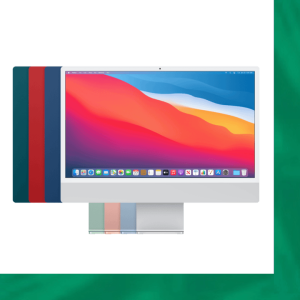
iMac 21.5-inch "Proof that great Macs don't retire—they just find new missions." -
Product SKU: C02NK5YJF8J3
Product Brand: Apple
Product Currency: USD
Product Price: 299
Price Valid Until: 2027-12-31
Product In-Stock: InStock


