
MacBook Air 13-inch $295
MacBookAir7,2
| MacBook Air 13-inch |
|---|
| “Because sometimes the smartest laptop in the room is the one not trying so hard.” |
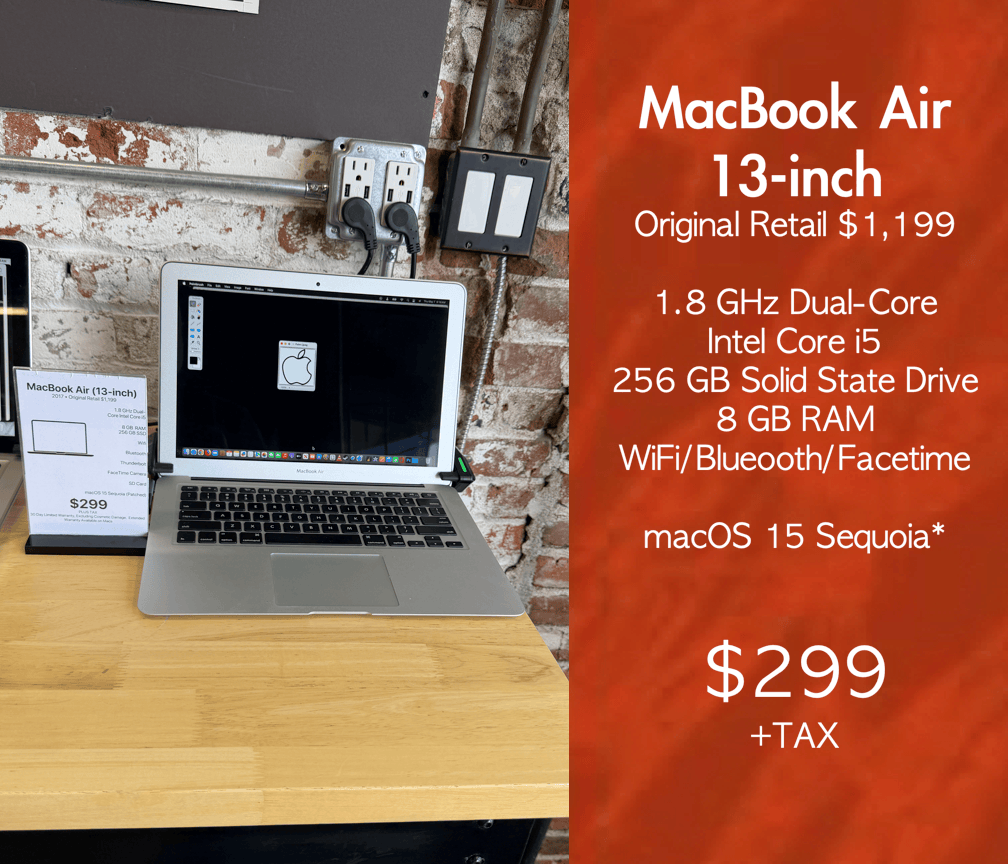
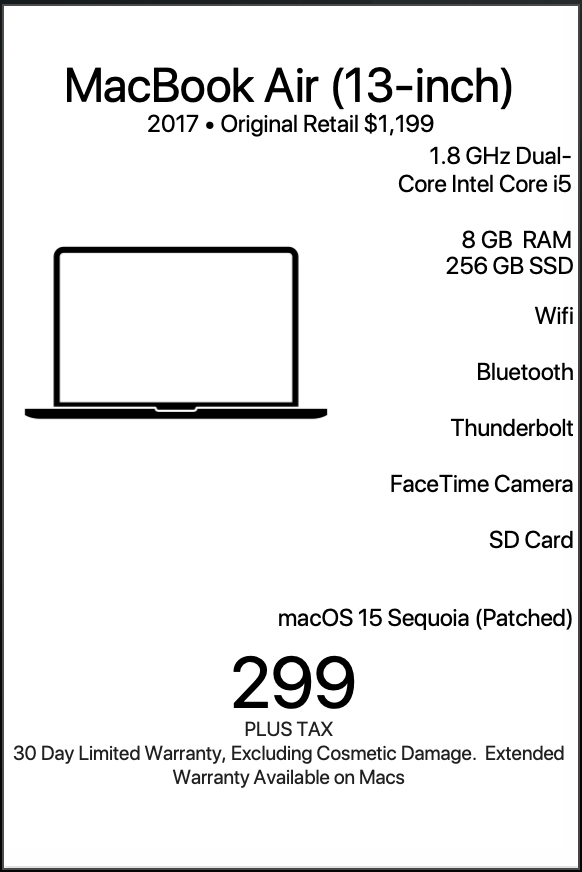
| The 2017 13-inch MacBook Air with a 1.8 GHz dual-core Intel Core i5, 8 GB RAM, and 256 GB solid-state drive occupies a fascinating place in the modern Mac landscape. At $299 with a warranty and patched to run macOS Sequoia, it becomes one of the most approachable, practical, and surprisingly versatile entry points into the Apple ecosystem. It is not merely a “cheap Mac.” It is a machine with a very specific personality, workflow, and audience. For the right user, it feels dependable, familiar, efficient, and refreshingly uncomplicated. |
LEARN MORE
| The 2017 MacBook Air represents the final evolution of Apple’s original wedge-shaped notebook design, one of the most recognizable laptop forms ever made. Its aluminum body, tapered edges, full-size keyboard, glowing Apple-era DNA, legacy ports, and lightweight footprint continue to resonate with users who prioritize function, portability, and simplicity. Apple equipped this generation with Intel HD Graphics 6000, a backlit keyboard, Multi-Touch trackpad, Thunderbolt 2 connectivity, USB-A ports, and all-day portability in a chassis weighing under three pounds. When paired with a modern patched installation of macOS Sequoia, the machine transforms into something uniquely compelling: a classic Mac experience with access to modern software, current browsers, modern iCloud integration, updated security frameworks, contemporary productivity tools, and Apple ecosystem continuity features. For many users, that combination is exactly what makes this computer so attractive. This MacBook Air is best suited for students, writers, travelers, remote workers, casual creatives, small business operators, first-time Mac owners, older users seeking simplicity, coffee-shop professionals, digital minimalists, nonprofit staff, reception desks, point-of-sale stations, homeschooling families, and anyone who values a lightweight, reliable, keyboard-focused computing experience without spending four figures. The first and perhaps most obvious ideal user is the student. A student needs reliability more than raw benchmark performance. They need a laptop that opens instantly, survives backpacks, handles Google Docs, Zoom, research tabs, PDFs, YouTube lectures, Microsoft Office, Canvas, Blackboard, email, and cloud storage without drama. The 2017 MacBook Air excels in exactly this environment. The SSD keeps the system responsive, while the dual-core Intel processor remains highly capable for everyday academic workloads. The 8 GB of RAM is especially important because it allows students to multitask comfortably between browser tabs, notes, streaming lectures, and communication apps. At $299 with a warranty, this machine becomes particularly powerful for students because it dramatically lowers the financial barrier to entering the Apple ecosystem. Instead of financing a brand-new machine costing over a thousand dollars, a student can gain access to macOS, iCloud, AirDrop, FaceTime, Safari syncing, and Apple’s productivity environment for a fraction of the cost. The keyboard also plays a huge role here. The pre-butterfly MacBook Air keyboard remains beloved because of its deeper key travel and comfortable tactile feel. Apple’s full-size backlit keyboard with 78 keys gives students an excellent typing experience for essays, lab reports, discussion posts, and long research sessions. This laptop is equally compelling for writers. There are machines that try to impress users with horsepower, and there are machines that quietly disappear beneath the workflow. The 2017 MacBook Air belongs firmly in the second category. Writers often prioritize comfort, battery life, portability, and focus over graphical performance. This MacBook Air creates an environment that encourages writing rather than distraction. Its wedge design remains exceptionally comfortable on desks, laps, couches, and coffee shop tables. The keyboard encourages long-form typing sessions. The screen, while straightforward and non-flashy, is easy on the eyes during extended writing periods. The machine boots quickly, wakes instantly, and feels calm and stable. For journalists, bloggers, students, authors, screenwriters, technical writers, grant writers, and administrative professionals, this laptop feels purpose-built. It runs Pages, Microsoft Word, Google Docs, Scrivener, Ulysses, Notion, Obsidian, and countless other writing environments smoothly. With macOS Sequoia patched onto the system, modern browser compatibility and cloud integration remain accessible as well. There is also something psychologically appealing about a machine like this. It lacks the intimidating complexity of modern ultra-premium devices. It feels approachable. Familiar. Predictable. Many users actually become more productive when technology fades into the background, and the MacBook Air excels at exactly that. Travelers are another perfect audience. The 2017 MacBook Air remains one of the most practical travel laptops Apple ever produced. Its weight of roughly 2.96 pounds makes it easy to carry through airports, hotels, conference centers, universities, and coworking spaces. Equally important, it includes real ports. Modern laptops often require dongles for everything. The 2017 MacBook Air still includes USB-A ports, Thunderbolt connectivity, an SD card slot, and MagSafe charging. For travelers, photographers, presenters, hotel users, and conference attendees, this dramatically simplifies life. USB flash drives plug in directly. Existing accessories work immediately. Presentation adapters are easy to source. SD cards from cameras insert directly into the machine. The MagSafe charger is particularly valuable for travel because it disconnects safely if snagged, reducing the risk of catastrophic drops in busy environments like airports or hotel rooms. Battery life also contributes to its appeal. Apple rated this generation for up to 12 hours of wireless web use. That kind of endurance still matters enormously to travelers working from terminals, waiting areas, and conference rooms. Remote workers are another excellent fit. The modern remote-work world depends more heavily on communication, organization, and browser-based workflows than raw workstation power. Many remote employees primarily live inside Slack, Zoom, Google Workspace, Microsoft Teams, email, spreadsheets, CRM platforms, and browser tabs. The 2017 MacBook Air handles these environments comfortably. Its 720p FaceTime camera supports virtual meetings, while the built-in microphones and speakers provide a competent conferencing experience. The machine’s quiet operation and professional appearance also help in client-facing situations. For customer support staff, administrative assistants, schedulers, dispatchers, coordinators, nonprofit workers, virtual receptionists, and operations personnel, this MacBook Air offers exactly what is needed: reliability, portability, and comfort. Small business owners represent another major audience. For many entrepreneurs, every dollar matters. Spending thousands on cutting-edge hardware may not align with operational priorities. A $299 MacBook Air with a warranty provides exceptional value because it allows business owners to allocate capital elsewhere while still maintaining a professional Apple-based workflow. This machine fits beautifully into boutiques, salons, repair shops, restaurants, hospitality desks, service counters, churches, nonprofits, pop-up retail environments, and mobile businesses. It can handle invoicing, QuickBooks, Square dashboards, Shopify administration, inventory systems, web ordering, customer communication, spreadsheets, and browser-based management tools. Because it includes USB-A ports, it integrates easily with printers, receipt systems, barcode scanners, and legacy accessories still common in many small businesses. The MacBook Air is also ideal for first-time Mac users. Many people remain curious about macOS but hesitate because of pricing. A modern MacBook can cost enough to create real anxiety around the purchase decision. At $299, the 2017 MacBook Air becomes approachable and low-risk. It allows users to experience the Apple ecosystem without financial intimidation. This matters because macOS remains one of the easiest desktop operating systems for nontechnical users to learn. The interface is clean, intuitive, and consistent. Combined with Apple ecosystem services like iCloud Photos, iMessage, FaceTime, AirDrop, and Notes syncing, the experience feels cohesive and welcoming. Users transitioning from Windows often appreciate the MacBook Air specifically because it still retains familiar concepts like USB-A ports, a traditional keyboard layout, and a non-touchbar design. Older users are another excellent audience. Many seniors and older adults do not want a complicated machine overloaded with aggressive design experimentation. They want something understandable, lightweight, dependable, and easy to carry around the house. The MacBook Air’s simplicity becomes a strength here. The backlit keyboard improves visibility. The large Multi-Touch trackpad is easy to use. The lightweight design reduces physical strain. The stable macOS environment minimizes confusion. The machine works well for email, web browsing, telehealth appointments, photo viewing, banking, video calls with family, and light office work. Patched macOS Sequoia support is particularly meaningful because it allows older users to continue using modern applications and websites without feeling digitally abandoned. Coffee shop professionals and digital nomads also fit this machine beautifully. The MacBook Air practically defines the café laptop aesthetic. Thin, quiet, light, and elegant, it remains one of the most recognizable portable work machines ever made. For freelancers, consultants, social media managers, bloggers, Etsy shop operators, and remote contractors, the laptop supports a highly mobile workflow. The SSD keeps apps launching quickly. The battery lasts through long work sessions. The aluminum chassis feels premium and durable. The keyboard encourages productivity. The lightweight design makes it effortless to move between locations throughout the day. The machine’s understated appearance also helps. It feels professional without being flashy. Digital minimalists may be among the best possible users for this computer. Modern computing increasingly encourages excess: excessive notifications, excessive power, excessive multitasking, excessive distraction. The 2017 MacBook Air feels focused by comparison. It encourages users to concentrate on core computing tasks rather than endless digital noise. For users intentionally seeking a calmer relationship with technology, this machine becomes deeply attractive. It handles writing, communication, research, music streaming, web browsing, light photo management, and productivity beautifully without constantly demanding attention. There is elegance in restraint, and this MacBook Air embodies that philosophy exceptionally well. Homeschooling families also benefit tremendously from machines like this. At $299 with warranty coverage, the MacBook Air becomes affordable enough for educational deployment without sacrificing quality. Parents gain access to a stable, reliable learning environment for children using Google Classroom, Zoom, educational websites, Office apps, research tools, and typing programs. Because the machine runs macOS Sequoia, modern browser compatibility remains accessible for current educational platforms. That is extremely important in today’s web-based learning environments. The durable aluminum construction also makes the machine practical for family use. This MacBook Air is also fantastic for reception desks and administrative stations. Many front-desk workflows revolve around browser tabs, scheduling software, customer communication, spreadsheets, intake forms, and email. The MacBook Air handles these tasks comfortably while presenting a polished professional appearance. Medical offices, repair businesses, salons, churches, retail stores, counseling offices, and hospitality environments can all benefit from inexpensive, reliable Apple hardware for front-office tasks. The legacy ports remain especially valuable in these settings because older printers, scanners, cash drawers, and accessories integrate more easily. Creative hobbyists are another strong audience. This machine is excellent for casual photography management, Canva work, light iMovie editing, podcast administration, music streaming, social media content scheduling, and graphic organization. Apple’s ecosystem of built-in creative tools remains surprisingly powerful. Applications like GarageBand, Pages, Keynote, Photos, and iMovie continue to provide tremendous value for hobbyists and light creators. The machine particularly shines for users creating content destined for social media, blogs, newsletters, or community projects rather than Hollywood-level production pipelines. The MacBook Air is also ideal for users who value repairability and serviceability culture. Unlike many modern ultra-sealed devices, the 2017 MacBook Air exists within a mature ecosystem of parts availability, repair knowledge, accessories, chargers, adapters, and community familiarity. This creates confidence for budget-conscious buyers. The design is well understood. Accessories are easy to source. Chargers remain inexpensive. Cases and adapters are everywhere. That ecosystem maturity matters enormously for long-term usability. For Apple ecosystem households, this machine works beautifully as a secondary Mac. Families deeply invested in iPhones, iPads, Apple TVs, AirPods, and iCloud services often benefit from having an extra Mac available around the house. The 2017 MacBook Air is perfect for kitchen counters, guest rooms, shared family workstations, travel use, or backup computing. Because it runs modern macOS through patching, it still integrates effectively with contemporary Apple workflows. The laptop is also excellent for users upgrading from extremely old Macs. Someone coming from a 2008–2012-era machine will likely experience this MacBook Air as a substantial modernization. The SSD alone dramatically changes the computing experience. Instant wake, fast boot times, responsive application launching, modern browser support, and lightweight portability all feel transformative. For these users, the machine provides enormous perceived value. There is also a very specific emotional audience for this laptop: users who miss “classic Apple.” The 2017 MacBook Air preserves many elements people associate with Apple’s golden laptop era. The glowing simplicity. The wedge silhouette. The MagSafe connector. The comfortable keyboard. The practical ports. The understated elegance. The sense that the computer exists primarily to help users get work done rather than to showcase experimental design priorities. For many users, that emotional resonance matters. This machine also works exceptionally well for nonprofit organizations and volunteer groups. Churches, community organizations, outreach programs, animal rescues, food banks, and educational nonprofits often need reliable computers at manageable prices. A $299 MacBook Air with warranty coverage becomes extremely compelling in these environments. The machine can handle donor databases, spreadsheets, newsletters, Zoom meetings, email campaigns, volunteer coordination, presentation software, and social media management efficiently and affordably. One overlooked audience is users who simply want a “real laptop.” Many modern ultraportables feel increasingly tablet-like. Shallow keyboards, limited ports, aggressive thinness, and reliance on adapters can frustrate users who just want a straightforward notebook computer. The 2017 MacBook Air unapologetically feels like a traditional laptop. It opens easily. It types comfortably. It connects directly to accessories. It sits securely on desks. It travels well. It behaves predictably. For many people, that familiarity is deeply appealing. Even casual entertainment users benefit from this machine. The MacBook Air comfortably handles YouTube, Netflix, Spotify, Apple Music, Plex, podcasts, social media, casual gaming, online shopping, and everyday media consumption. Its speakers are clear, the display is pleasant for extended use, and the portability encourages relaxed use throughout the home. Some light gaming is also possible. Community discussions around this model frequently note that many older or lightweight games remain playable on Intel HD Graphics 6000 hardware. That makes the machine enjoyable for casual titles, indie games, retro gaming, emulation, and lighter entertainment experiences. The Thunderbolt 2 connectivity also provides meaningful flexibility. Apple notes support for external displays up to 4K resolution. This allows users to build comfortable desktop setups at home or work while maintaining portability. Ultimately, the 2017 13-inch MacBook Air succeeds because it aligns with how many people actually use computers. Most users are not rendering Hollywood films or training AI models. They are communicating, organizing, researching, writing, browsing, learning, presenting, and managing life. This MacBook Air handles those workflows with confidence, elegance, and simplicity. At $299 with a warranty, the value proposition becomes remarkably strong. Users receive genuine Apple hardware, a premium aluminum chassis, an excellent keyboard, solid battery life, lightweight portability, practical connectivity, SSD responsiveness, and modern macOS functionality through Sequoia patching. For students, writers, travelers, remote workers, first-time Mac users, nonprofits, coffee-shop professionals, digital minimalists, administrative staff, families, and practical everyday users, the 2017 MacBook Air remains not just relevant, but genuinely enjoyable. It is a machine for people who want technology to feel approachable, useful, portable, dependable, and quietly capable. And for exactly those people, it fits beautifully. |
| *Patch is not a natively supported macOS, performance of third party is not guaranteed. |
| Denver Mac Repair Warranty 30 days from purchase, excludes cosmetic damage, Extended Warranty available. |
Check Out these other Available Macs and Apple devices!
- MacBook Air 13-inch “Big M2 energy in a sleek little MacBook Air—fast, featherlight, and ready to make your workload jealous.”

- MacBook Air 13-inch “Small in size, mighty with M1—this MacBook Air brings big energy to your everyday adventures.”
- MacBook Air 13-inch “Light on its feet, loaded with storage, and powered by M1 magic.”
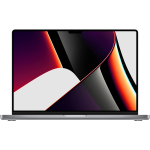
- MacBook Pro 16-inch “M1 Pro power, 16 GPU cores, and 16 inches of “go ahead, open another app.””
- MacBook Pro 16-inch “Serious performance. Seriously good deal.”
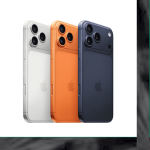
- iPhone Air “Thin enough to disappear in your pocket. Powerful enough to steal all your attention.”
- Mac mini w/23-inch Display “Less chaos. More aluminum.”
- DENVER MAC REPAIR IS PURCHASING APPLE DEVICES!!




Denver Mac Repair is not associated with Affirm, see app (click logo above) for terms, conditions and detail.
Also visit Boulder Mac Repair – 2525 Broadway, Boulder CO 80304
Boulder Mac Repair – Macs for Sale
See shop for current availability. Apple equipment sales are final.
Any errors are wholly unintentional and we apologize if erroneous information is reflected in merchandise price, item availability, or in any way affects your individual order.
Denver Mac Repair reserves the right to correct any errors, inaccuracies or omissions and to change or update information at any time without prior notice.
Denver Mac Repair reserves the right to cancel any promotion, or offer at any time and for any reason.


MacBook Air 13-inch “Because sometimes the smartest laptop in the room is the one not trying so hard.” | Denver Mac Repair
MacBook Air 13-inch “Because sometimes the smartest laptop in the room is the one not trying so hard.” -
Product SKU: FVFXD212J1WV
Product Brand: Apple
Product Currency: USD
Product Price: 299
Price Valid Until: 2026-12-31
Product In-Stock: InStock


