
MacBook Air 15-inch $895
Mac14,15

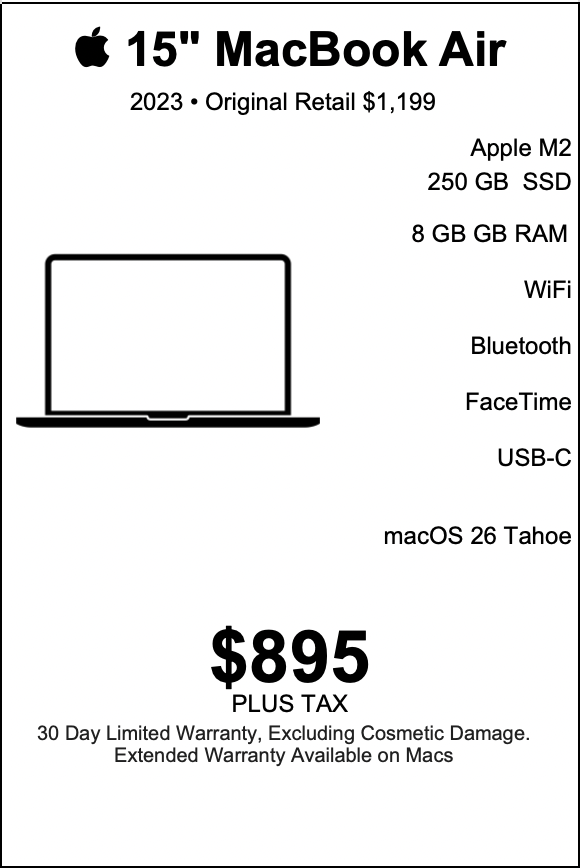
| MacBook Air 15-inch |
|---|
| “Bigger screen, lighter load — this 15-inch MacBook Air’s got more hustle than your morning coffee.” |
| The 2023 15-inch MacBook Air with Apple Silicon M2, 8 GB RAM, 250 GB SSD, Force-Touch trackpad, a built-in full-size 78-key keyboard with 4 arrow keys and integrated Touch ID, Apple Graphics, a 1080p FaceTime HD camera, 802.11ax Wi-Fi 6, Bluetooth 5.3, and two Thunderbolt/USB-4 ports (Thunderbolt 3 speeds up to 40 Gbps / USB 3.1 Gen 2 up to 10 Gbps) running a version of macOS 26 Tahoe, priced at $895 with warranty (original retail $1,199) presents a bright, streamlined option for a large, ambitious slice of people who value lightness, long battery life, and confident everyday performance. The ideal users love clarity, portability, and an experience that feels modern and effortless. |
LEARN MORE
| The core archetype: The mobile creative professional This MacBook Air suits the creative professional who lives in motion. Photographers, content creators, social media strategists, freelance videographers who edit light footage, podcasters who record and edit audio clips, graphic designers who focus on web assets and social creatives, and illustrators who sketch in vector or raster apps at moderate resolution find that the M2 chip provides responsive, joyful performance. The 15-inch display gives a more generous canvas for timelines, palettes, and reference imagery without adding heavy weight. The Force-Touch trackpad provides precise gestures for editing and scrubbing, and the full-size keyboard with Touch ID helps secure sensitive client files while keeping the typing flow smooth and fast. This user opens apps, moves between browser tabs and design tools, and previews exports with a satisfying speed that supports an uninterrupted creative rhythm. They carry the laptop to coffee shops, client meetings, galleries, and rooftop work sessions. The 15-inch screen presents projects with clarity and scale, making collaborative reviews comfortable and immediate. The 250 GB SSD stores active projects and reference material; the user leverages cloud storage for archives and large raw files, which keeps the MacBook Air light and nimble. The hybrid worker who values comfort and endurance A hybrid worker who splits time between home, office, and remote locations appreciates the Air’s balance. The larger display supports side-by-side documents, lengthy spreadsheets, and video calls that look crisp thanks to the 1080p FaceTime HD camera. macOS 26 Tahoe gives them modern multitasking features and window management that align with how they organize tasks: a focused document on one side, a communication app on the other, and a browser window with quick research. They enjoy the quiet, fanless design and feel the longevity during long days. The Air stays cool and responsive through presentation prep, synchronous meetings, and asynchronous deep work blocks. The Bluetooth 5.3 connection pairs with a wireless keyboard and headphones with immediate reliability. Two Thunderbolt/USB-4 ports give them the option to connect an external monitor at a trade show table or plug in an adapter for a conference room projector. The student who craves power without bulk Students ranging from undergraduates to graduate researchers find this MacBook Air perfectly aligned with campus life. The 15-inch display is ideal for annotated readings, split-screen study sessions, and group projects. The machine slips easily into backpacks and fits in lecture hall trays with space for notebooks. The 1080p FaceTime HD camera makes virtual study groups and professor office hours look clear and professional. Students enjoy instant wake, fast web browsing for research, and the ability to run virtual machine previews or coding environments for classes. The Touch ID sensor improves workflow by streamlining secure logins for learning management systems, cloud drives, and research portals. Battery endurance lasts through class blocks, library sessions, and evening study marathons, and the warranty gives extra reassurance during a busy semester. The efficient professional who runs meetings and presentations Executives, team leads, consultants, and salespeople love the MacBook Air for its poise in presentation and meeting contexts. They open decks and demos with confidence. The larger screen helps with on-the-fly edits and presenter notes. The laptop connects to displays through a single adapter and delivers crisp visuals to clients or stakeholders. This user values the Air’s aesthetic: polished aluminum, thin profile, and an understated presence in a boardroom. They rely on macOS 26 Tahoe’s continuity features to answer calls from their phone, transfer files to an iPad for onstage sketching, and use AirDrop to exchange materials with colleagues instantly. They move from plane to cab to meeting room with a seamless workflow. The lifelong learner who samples apps and hobbies This MacBook Air delights lifelong learners. They jump between language apps, online classes, music lessons, amateur coding, and hobbyist photo editing. The M2 chip encourages curiosity rather than intimidation: apps open quickly, rendering happens smoothly, and the ecosystem supports experimentation. When they take an online course, they keep notes, record practice sessions with the microphone, and combine readings and projects side by side. The 250 GB SSD gives quick access to ongoing projects, and the user leverages cloud services to extend capacity. They enjoy the laptop’s simplicity, which encourages consistent learning habits and exploration without friction. The road warrior who values battery life and lightness Consultants, traveling salespeople, writers on assignment, and digital nomads who move constantly across cities and time zones find the 15-inch Air’s weight and endurance a daily advantage. The laptop creates a compact mobile office that fits on a tray table or café stool. The battery life allows long stretches of productivity between outlets, and Wi-Fi 6 keeps them reliably connected in modern hotspots and hotel networks. The two Thunderbolt/USB-4 ports support quick charging and peripheral connections at co-working spaces. The robust M2 performance helps during multitasking: spreadsheets, CRM access, video calls, and note-taking remain smooth. They appreciate the hinge that opens confidently to optimal angles for typing and presentations. The developer who values clarity and responsiveness Developers who build web apps, mobile apps, or command-line utilities benefit from the M2 chip’s balance of single-core speed and energy efficiency. They run local servers, containers, and editors alongside a browser filled with debugging tabs, and the Air handles these tasks with composure. The 15-inch display presents code with readable line length without constant vertical scrolling. This developer leverages macOS 26 Tahoe’s Unix underpinnings and integrates tools like Homebrew, Terminal, Xcode, and lightweight IDEs. They synchronize repositories, run test suites for smaller projects, and preview responsive designs. The Thunderbolt ports provide fast file transfers for test data and the ability to connect to external SSDs for cache or build artifacts. The casual gamer and multimedia consumer This MacBook Air provides delightful casual gaming and streaming experiences. The Apple Graphics on the M2 chip render indie titles and Apple Arcade games with pleasing frame rates, and the 15-inch screen brings immersive visuals to story-driven games and puzzles. Video streaming of movies and series in high definition looks crisp, and the 1080p FaceTime HD camera and microphone support live streaming and content interactions. The user pairs headphones with Bluetooth 5.3 and enjoys clear audio with low latency. The machine funnily balances entertainment with productivity: downtime becomes rejuvenating without interrupting the workflow. The photographer with a portable editing kit A photographer who shoots on the run uses this MacBook Air as a portable culling and editing station. They import JPEGs and lightly edited RAW files, use Photos and a favorite editor to adjust exposure and color, and create quick galleries for clients. The 15-inch display gives a larger preview area for composition and cropping. They rely on smart previews and cloud sync to move larger RAW libraries to external storage or cloud archives. Touch ID secures client galleries and financial information. The Air’s speed helps when exporting web-ready images and creating slide decks for client presentations. The small footprint and weight let the photographer carry a capable editing machine to shoots and client meetings. The podcast host and audio editor Podcasters and audio editors who record interviews and produce episodes in small studios benefit from the MacBook Air’s low noise and stable performance. They run recording software, edit waveforms, and export episodes with efficient turnaround. The Thunderbolt ports connect to audio interfaces for high-quality inputs and outputs. Bluetooth 5.3 connects to wireless monitoring devices and control surfaces with low latency. The 15-inch screen makes timeline editing easier, and macOS 26 Tahoe integrates with audio tools and file management for polished production. The user appreciates the fast boot times and immediate project recall. The small business owner running operations and marketing Small business owners use the MacBook Air as a central operations device. They manage invoicing, email, client communication, marketing assets, and inventory management with confident speed. The larger screen helps them manage spreadsheets and dashboards. They prepare product photography, post to social media, and run light e-commerce tasks with efficiency. The warranty gives peace of mind during busy seasons. The user leverages cloud backups and shared calendars to coordinate staff schedules and client bookings. The Air’s reliability streamlines daily operations and fosters business growth. The accessibility-forward user This MacBook Air serves accessibility-forward users who value screen scaling, VoiceOver, switch controls, and other macOS accessibility features that enhance independence. The generous 15-inch display supports increased text sizes without losing workspace. Touch ID eases authentication, and the FaceTime HD camera supports clear video calls with friends, advocates, or remote services. The machine empowers users to customize input methods and adapt the environment for comfort and efficiency. How the MacBook Air supports real, repeatable workflows Beyond personas, the MacBook Air fits into concrete workflows that repeat day after day. Morning routines and daily setup A user opens the laptop and immediately gets to work. macOS 26 Tahoe presents updated notifications and a clean desktop. The FaceTime HD camera checks for quick video calls, and the keyboard springs to typing. The user uses Touch ID to authenticate payments or secure documents. Wi-Fi 6 joins familiar networks seamlessly, and the battery indicator shows confidence for the day ahead. Focused deep work blocks During deep work, the user closes notifications, arranges windows, and uses the Force-Touch trackpad to scrub media or navigate precise selections. The M2 chip supports sustained single-core work with efficiency. The 15-inch display reduces context switching because the user sees more content at once. Hybrid collaboration When the user collaborates, they connect to external displays when necessary, share screens with minimal latency, and use the 1080p camera to communicate eye-to-eye. The two Thunderbolt ports enable quick connections to docks or displays and fast file movement for collaborative assets. Traveling and presentations When the user travels, they pack a compact charger, a slim sleeve, and a small hub. The Air’s thinness and weight reduce strain. The laptop presents confident visuals to audiences, and the tactile keyboard helps deliver keynote notes without distraction. Evening creativity and entertainment In the evening, the user switches to creative hobbies and entertainment. Video streaming looks vivid, indie games run smoothly, and audio editing tools allow finishing touches on personal projects. Accessories and ecosystem choices that amplify the experience Certain accessories create a tailored experience: A compact USB-C hub with HDMI or DisplayPort adds display and legacy ports. An external SSD for photo/video archives keeps the internal 250 GB SSD dedicated to active projects. A MagSafe or USB-C charging brick that fits travel life pairs well with the two Thunderbolt ports. A lightweight sleeve protects the machine during daily transport. Noise-cancelling Bluetooth headphones pair via Bluetooth 5.3 for low-latency listening and clear calls. A portable monitor increases screen real estate for multi-app workflows when at a desk. A compact mechanical or ergonomic keyboard complements long typing sessions while preserving the Air’s portability. These additions create a workstation that remains mobile, flexible, and tailored to the user’s precise needs. Software habits and smart storage strategies Users develop software habits that match the Air’s strengths: Leveraging cloud storage (iCloud, external cloud services) for large libraries preserves the 250 GB SSD for active files and sandboxes. Using optimized photo libraries and smart previews for photo workflows balances performance and storage. Employing lightweight or web-native tools for routine tasks keeps the machine responsive. Periodically syncing large backup snapshots to external drives or network storage safeguards archives while keeping the Air clean and quick. These strategies encourage continuous productivity without friction. The experience of ownership: design, build, and daily delight Owning the 2023 15-inch MacBook Air feels intentional. The aluminum chassis presents a cool, refined touch. The thin profile gives an immediate sense of mobility. The larger display transforms small tasks into pleasurable moments of clarity. The keyboard provides a consistent, reliable typing feel for writers, managers, and creators. Touch ID reduces friction. macOS 26 Tahoe integrates hardware and software seamlessly so that features work as expected and enhance daily life. The warranty included with the $895 purchase reinforces confidence. The original retail price of $1,199 helps the user appreciate the value they hold: a generous screen, the M2 chip’s modern performance, and a carefully designed Apple experience. Daily scenarios — vivid snapshots of life with the Air A morning in a café Sunlight filters across a small table. The user opens the 15-inch Air, types notes for a proposal, and switches to a design mockup. They export JPEGs and upload them to a client folder. A video call with a colleague uses the 1080p FaceTime HD camera and a Bluetooth headset. The machine stays cool, and the battery marches confidently through the morning. A campus afternoon A student rides the campus shuttle, opens the Air to review a journal article, and highlights passages for later citation. They split the screen between the article and an outline. Later, they join a study group via video call and present slides from Keynote. A flight across time zones A consultant drafts a slide deck and rehearses speaker notes offline. The battery remains steady through the flight. They land and connect to a conference room projector via a compact hub. They present with ease and confidence. A weekend creative session A podcaster records an interview, edits it on the Air, and exports an episode. An indie developer tests a new app, runs a quick local server, and previews changes in a browser. A photographer trims a gallery and uploads client proofs from a coffee shop. Why this MacBook Air captures modern needs The 2023 15-inch MacBook Air with M2 embodies a contemporary blend of mobility, display real estate, and performance that aligns with how people work today. It gives users a comfortable workspace without sacrificing portability. The M2 chip balances power and efficiency. The 15-inch size presents more content and preserves portability. The 250 GB SSD encourages smart cloud and external storage habits. Two Thunderbolt/USB-4 ports provide connectivity without complexity. Wi-Fi 6 and Bluetooth 5.3 support modern peripherals and networks. macOS 26 Tahoe brings refined features and stability to the experience. |
| Features Support for Apple Intelligence. |
| Denver Mac Repair Warranty 30 days from purchase, excludes cosmetic damage, Extended Warranty available. |
Check Out these other Available Macs and Apple devices!
- MacBook Air 13-inch “Big M2 energy in a sleek little MacBook Air—fast, featherlight, and ready to make your workload jealous.”

- MacBook Air 13-inch “Small in size, mighty with M1—this MacBook Air brings big energy to your everyday adventures.”
- MacBook Air 13-inch “Light on its feet, loaded with storage, and powered by M1 magic.”
- MacBook Pro 16-inch “M1 Pro power, 16 GPU cores, and 16 inches of “go ahead, open another app.””
- MacBook Pro 16-inch “Serious performance. Seriously good deal.”
- iPhone Air “Thin enough to disappear in your pocket. Powerful enough to steal all your attention.”
- Mac mini w/23-inch Display “Less chaos. More aluminum.”
- DENVER MAC REPAIR IS PURCHASING APPLE DEVICES!!




Denver Mac Repair is not associated with Affirm, see app (click logo above) for terms, conditions and detail.
Also visit Boulder Mac Repair – 2525 Broadway, Boulder CO 80304
Boulder Mac Repair – Macs for Sale
See shop for current availability. Apple equipment sales are final.
Any errors are wholly unintentional and we apologize if erroneous information is reflected in merchandise price, item availability, or in any way affects your individual order.
Denver Mac Repair reserves the right to correct any errors, inaccuracies or omissions and to change or update information at any time without prior notice.
Denver Mac Repair reserves the right to cancel any promotion, or offer at any time and for any reason.


MacBook Air 15-inch “Bigger screen, lighter load — this 15-inch MacBook Air’s got more hustle than your morning coffee.” | Denver Mac Repair
MacBook Air 15-inch “Bigger screen, lighter load — this 15-inch MacBook Air’s got more hustle than your morning coffee.” - M2 250 GB Solid State Drive 8 GB RAM macOS 26 Tahoe Apple Silicon with Apple Intelligence Support
Product SKU: JXF7D07VTV
Product Brand: Apple
Product Currency: USD
Product Price: 895
Price Valid Until: 2026-12-31
Product In-Stock: InStock


