
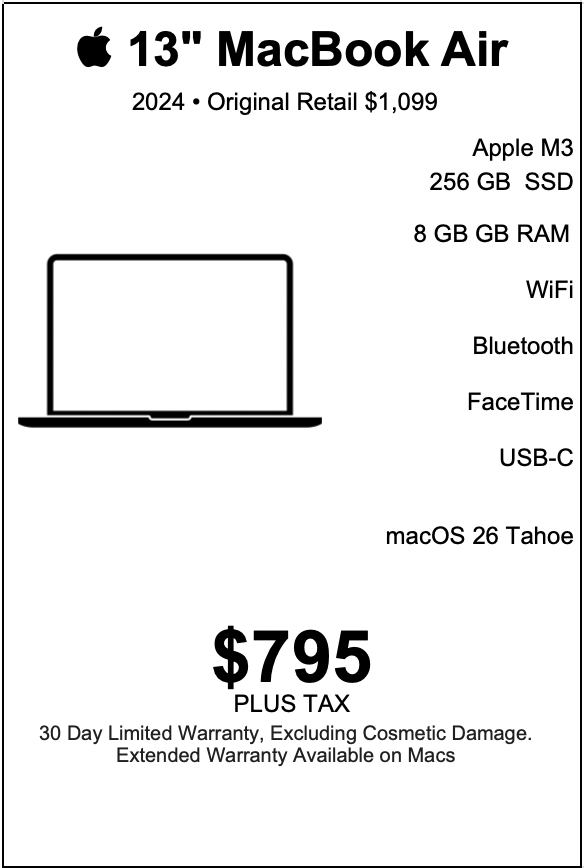
MacBook Air 13-inch $795
Mac15,12

| MacBook Air 13-inch |
|---|
| “For people who want all the power, none of the bulk, and absolutely zero excuses.” |
| The 2024 13-inch MacBook Air with Apple Silicon M3, 8 GB of unified memory, 256 GB of solid-state storage, Force-Touch trackpad, full-size 78-key keyboard with integrated Touch ID, Apple Graphics, 1080p FaceTime HD camera, Wi-Fi 6E (802.11ax), Bluetooth 5.3, and two Thunderbolt / USB-4 ports is a balanced, joyful machine. Priced at $795 with warranty and originally retailing at $1,099, this machine presents an elegant combination of portability, performance, and polish. The people who thrive with this MacBook Air have particular priorities and habits. The following longform portrait—written entirely in present tense and celebrating strengths—paints who best matches this laptop, how they use it day to day, and why the design decisions and specifications sing for specific users. |
LEARN MORE
| An everyday creative chooses tools that feel like an extension of their taste. This MacBook Air matches that intuitive relationship. The M3 chip delivers quick, responsive performance for the creative tasks that form this person’s daily life: photo tweaks, vector sketches, layout work, light video trimming, and multitasking across tabs and apps. The unified architecture of Apple Silicon gives efficient memory use and responsive app switching; the creative notices that when switching from a reference browser window to a canvas in a matter of heartbeats. This creative works in cafés, sunlit studios, and shared co-work spaces. They prize portability and a whisper-thin profile so their bag stays light and movement stays easy. The 13-inch display balances screen real estate and compactness; the creative sketches in Procreate or edits in Affinity Photo while keeping their reference panels open. The 1080p FaceTime camera presents them clearly in client calls; the built-in microphones convey passion and clarity. Touch ID keeps project files secure while letting them authenticate purchases and cloud sync with a thumb. The Force-Touch trackpad delivers precise control when fine adjustments matter. Two Thunderbolt ports offer fast external drive options and compact docks for studio setups. This user values workflows that feel elegant rather than clumsy. They open multiple design files, keep a reference board in a browser tab, and run a music app in the background without hesitation. They export assets quickly and share links confidently. For them, the MacBook Air supports creative joy and efficient production. The student who studies smarter, presents smoother, and carries less Students move from lecture halls to libraries, from group study to campus cafés. The MacBook Air’s light weight and slim footprint make it an ideal companion for backpacks and rolling laptop bags. The battery efficiency of the M3 chip and macOS energy-aware behaviors let a full day of notes, research, and presentations unfold without constant charging rituals. Notes appear instantly in their preferred note app. Lecture recordings synchronize with their study system. They annotate PDFs, create slide decks with polished transitions, and run collaborative documents with peers. The 13-inch size fits comfortably on cramped desks and in lecture hall trays. The keyboard invites long typing sessions; the tactile feel and integrated Touch ID simplify both login and secure purchases for campus essentials. The Wi-Fi 6E connection links to campus networks with stable throughput that supports cloud backups and seamless file sharing. Two Thunderbolt ports let them attach an external display for study marathons or connect to high-speed storage for media projects. The student feels professional and prepared with a machine that looks the part while staying nimble. The traveling professional who values lightness, security, and connectivity A traveling professional understands that every ounce counts and that every meeting matters. This MacBook Air aligns with that sense of economy and elegance. It slips into a small carry bag; it slides under an airline seat; it appears polished on a café table in any time zone. The M3 chip yields quiet efficiency, so the machine runs cool and fanless—contributing to a calm, distraction-free presence. In meetings and calls the 1080p FaceTime camera shows the professional with clarity and color balance. Dual microphones pick up voice with professional presence. The full-size keyboard facilitates fast, accurate communication. Touch ID secures corporate credentials, banking apps, and encrypted drives without interrupting workflow. The Thunderbolt ports connect to presentation adapters and fast external drives. Wi-Fi 6E and Bluetooth 5.3 maintain stable connections to hotel and conference networks, wireless earbuds, and portable devices. The professional experiences a consistent, reliable platform for presentations, proposals, and correspondence. The teacher and educator who shares, explains, and inspires Educators use technology to amplify clarity and engagement. This MacBook Air helps them create lesson plans, host interactive lectures, and annotate materials on the fly. The 1080p FaceTime camera offers crisp video for remote students. The lightweight chassis encourages movement in classrooms; the teacher carries it between offices, classrooms, and meeting rooms with ease. The teacher composes lecture notes, loads educational software, and manages multiple browser tabs for research and resources. The Force-Touch trackpad supports precise annotations during live demos. Touch ID secures gradebooks and personal data while simplifying login in shared systems. Two Thunderbolt ports let them connect to classroom projectors or external displays for large-format presentations. The battery longevity supports day-long classes and after-school sessions. This machine helps educators present polished content and maintain a nimble classroom presence. The entrepreneur and side-hustler who builds, communicates, and scales Entrepreneurs value tools that match their pace: quick, flexible, and ready to present at any moment. The MacBook Air supports the entrepreneur who answers investor emails between meetings, builds a lean marketing site in an afternoon, produces short promotional videos, and tracks numbers across spreadsheets. The M3 processor keeps tabs responsive and cloud sync seamless; boot and wake times feel instant. The entrepreneur launches prototypes, edits product photos, and runs light backend tools, all on a device that fits into a commuter bag. Two Thunderbolt ports connect to portable SSDs and compact external monitors for pop-up offices in coffee shops or coworking spaces. Wi-Fi 6E maintains fast uploads for pitch decks and media assets. The FaceTime camera helps craft polished video updates and investor calls. The integrated Touch ID bolsters security for business accounts while keeping sign-in efficient. The entrepreneur uses this MacBook Air as a flexible headquarters that scales between ideation and client delivery. The remote worker who builds routines and holds presence Remote workers value a dependable, pleasing laptop because their desk exists wherever they choose to be. The MacBook Air establishes a reliable home base: fast app launches, fluid multi-app workflows, and a display calibration that makes long hours comfortable. The keyboard invites long writing sessions; the large trackpad streamlines window navigation and multitouch gestures. The 1080p FaceTime camera presents them professionally in team calls. The device’s consistent performance encourages better habits: organized files, regular backups, and calmer, productive days. This remote worker plugs in a single-cable dock to a Thunderbolt port at their home desk for a multi-monitor setup during deep work, then disconnects and carries the machine to a morning yoga class followed by a café meetup. Wi-Fi 6E connects at home and in public spaces with reliability. The user enjoys the blend of mobility and domestic stability this laptop provides. The programmer and app developer building modern apps Developers benefit from Apple Silicon’s developer friendliness. The M3 chip handles local builds for many projects and runs simulation tools with fluid responsiveness. The developer writes code in an editor, runs tests, and deploys without unnecessary friction. Lightweight containerization tools, local servers, and web previews work smoothly for common development workflows. The 8 GB unified memory and efficient architecture enable multiple lightweight tools to run together: a code editor, browser with many tabs, a terminal session, and a simulator. This developer uses the two Thunderbolt ports for local device testing, connecting to iPhones for live debugging or to external SSDs for quick test data. The 13-inch form factor sits comfortably on a coffee shop table while they pair-program with a teammate over a video call. Touch ID secures developer credentials and keychain items. The MacBook Air acts as a capable development machine for modern app projects, prototypes, and continuous iterations. The music lover and podcaster who crafts audio with finesse A creative working with audio enjoys a lightweight setup that honors sound detail and editing precision. The MacBook Air offers responsive timelines in audio editors and rapid bounce/export times for short sessions. The M3 chip’s media processing capabilities support multitrack edits for podcasts, voiceovers, and quick music mixes. The FaceTime camera and built-in microphones record high-quality reference takes and virtual interviews. External audio interfaces connect via the Thunderbolt ports for higher-fidelity capture and monitoring. The podcaster edits episode segments, processes levels, and uploads for distribution while on the move. The music lover organizes playlists, edits live recordings, and archives sessions to external storage. The MacBook Air fosters a sonic studio that balances portability and creative control. The frequent presenter and public speaker who values polish and reliability Speakers require a machine that makes them feel in command. Presentations open without lag; slides advance seamlessly; video clips play smoothly. The MacBook Air’s responsiveness and video decoding strengths make it ideal for slide-rich talks and multimedia presentations. The FaceTime camera allows talks from remote locations with studio-style clarity. The keyboard supports fast note edits between sessions. Thunderbolt docks yield simple connections to venue projectors and presentation mixers. This presenter prepares crisp decks, rehearses with confidence, and carries a compact digital stage in a laptop bag. They step on stage knowing their material and their machine are in harmony. The small business owner and retail manager who keeps operations moving Small business owners juggle spreadsheets, POS systems, inventory lists, payroll, and customer communications. The MacBook Air integrates smoothly into software ecosystems for bookkeeping, inventory tracking, scheduling, and online storefront updates. The two Thunderbolt ports connect to external drives for backups and to external displays for in-store dashboards. Touch ID simplifies secure logins for banking apps and administrative tools. The compact size frees desk space while giving enough power for point-of-sale reporting and customer presentations. This owner tracks sales, updates product listings, and handles customer queries with a sense of calm and efficiency that the MacBook Air fosters. The visual storyteller and social creator who crafts micro-media fast Creators who publish daily social content value a machine that is fast at editing, uploading, and publishing. The M3 chip helps transcode short videos quickly. The FaceTime camera offers a crisp front capture for quick talking-head pieces and on-the-go livestream interactions. Photo edits export swiftly. Wi-Fi 6E accelerates uploads. The MacBook Air becomes a content studio that fits in a street bag: it edits clips between shoots, uploads to social platforms, and schedules posts in a few intuitive steps. The storyteller drafts captions, crops visuals in a snap, and moves from idea to publish with minimal friction. Their creative output increases because the laptop supports speed and polished export. The minimalist who appreciates form, function, and thoughtful design A minimalist values clean lines, efficient habits, and a machine that just works. The MacBook Air’s aluminum unibody, refined keyboard, and Force-Touch trackpad embody design restraint. The 13-inch footprint sits on a tidy desk without visual noise. The user stores essential files in organized folders and leverages iCloud for synchrony. They take pride in the MacBook Air’s balance of material and performance, treating it as a tool that supports mindful workflows. The device integrates into their lifestyle as a purposeful object rather than a clutter source. The caregiver and organizer who keeps family life coordinated Household management involves calendars, bills, medical records, photo albums, and school documents. The MacBook Air acts as a central hub for family organization. The user schedules appointments, supports shared calendars, organizes scanned documents, and backups family photos. The 1080p FaceTime camera facilitates video calls with relatives. Touch ID secures payment apps and medical portals while keeping day-to-day actions simple. The compact machine fits on kitchen counters and bedside tables, supporting family logistics with reliability and approachable design. The lifelong learner who explores courses, books, and multimedia A curious mind uses technology to expand horizons. The MacBook Air hosts online courses, research databases, eBooks, and multimedia lectures. The M3 chip renders lecture videos smoothly and supports multiple tabs for research and note-taking. The keyboard encourages long reading reflections and summary writing. Wi-Fi 6E ensures streaming videos keep high quality. The user bookmarks articles, annotates PDFs, and composes essays with a sense of flow that this laptop supports. The hybrid student-professional balancing study and early career work A hybrid user transitions between academic projects and fledgling professional roles. They compile research, prepare reports, code small apps, and join client calls. The MacBook Air’s flexibility accommodates both worlds with grace. The device’s light weight supports campus commutes while its modern connectivity supports professional setups. They switch contexts smoothly and present a polished presence in both spaces. The appreciator of ecosystem synergy who thrives in Apple continuity This user values the magic of devices that interoperate. The iPhone, iPad, and MacBook Air form a fluid environment: Universal Clipboard, Handoff, AirDrop, and Continuity Camera enhance workflows. They capture a photo on their iPhone and drag it into a presentation on the MacBook Air. They answer messages or phone calls on the laptop. They unlock the Mac with their Apple Watch. For them, the MacBook Air becomes part of a coherent creative system that multiplies productivity through seamless handoffs. The privacy-minded professional who appreciates built-in security Security integrates into workflow for professionals who handle sensitive documents. The MacBook Air’s secure boot, integrated Touch ID, and macOS privacy controls empower confident use of cloud services and encrypted storage. The user encrypts backups, uses secure passwords, and keeps sensitive client data protected with minimal friction. Authentication stays fast without sacrificing integrity. The laptop feels like a trustworthy partner for responsible work. The esports spectator and light gamer who enjoys polished visuals A user who loves visually engaging indie games and modern, well-optimized titles finds the MacBook Air’s Apple Graphics delightful. Casual gaming sessions happen in the evenings: well-designed titles, strategy games, and puzzle adventures run with pleasing visuals and smooth frame rates in many cases. The compact size supports couch gaming; Thunderbolt ports support an external controller or streaming stick. For this user, gaming becomes a relaxing after-work hobby on a refined, portable device. The freelancer who dances between clients and deadlines Freelancers juggle diverse client needs: content, consulting, design, or development. The MacBook Air supports a wide array of apps and services in a single machine. The freelancer opens invoices, edits deliverables, runs virtual meetings, and mobilizes assets with speed. Touch ID secures client accounts; Thunderbolt ports connect to external drives for client backups. The portability helps them create a workspace wherever inspiration strikes. The machine supports autonomy and reliable delivery. The photographer who curates and shares a focused selection Photographers who curate and share selective portfolios love a machine that supports efficient editing, export, and sharing. While studio-grade workflows sometimes use larger machines, the MacBook Air becomes the perfect mobile studio for on-site edits, client previews, and quick deliveries. The M3 chip accelerates common image processing tasks, and the color-accurate display renders photos with pleasing fidelity. The photographer imports a session to a portable drive, edits highlights, and shares proofs while still at a shoot. This portability helps them close the creative loop faster and impress clients with tight turnarounds. How the specifications amplify these users’ strengths Every spec of this MacBook Air contributes to the user experiences above. The M3 processor balances speed for everyday creative work and efficiency for long battery life. The 8 GB unified memory pairs with M3’s memory architecture to provide responsive multitasking for the common workflows described. The 256 GB SSD gives fast app launches and quick access to active projects; two Thunderbolt ports expand storage through high-speed external drives when larger archives are necessary. The Force-Touch trackpad gives tactile consistency for gestures and fine control during edits. The full-size keyboard invites long writing sessions; Touch ID ensures fast authentication that meshes with daily habits rather than interrupting them. The 1080p FaceTime camera elevates remote interactions, presenting users with crisp, true-to-tone video calls that feel professional. Wi-Fi 6E and Bluetooth 5.3 provide robust, modern connectivity for cloud sync, high-quality audio devices, and fast network transfers. The compact size and elegant aluminum chassis reflect a thoughtful design that communicates professionalism and quiet confidence. The intangible qualities: confidence, focus, and presence Beyond specs lies a machine that cultivates certain intangible experiences. Users feel confident because the MacBook Air responds when they need it to: apps open quickly, files save reliably, calls stream smoothly. That confidence breeds focus. Users spend time solving problems, crafting ideas, and producing work rather than troubleshooting. The MacBook Air’s presence—its weight, finish, and muted aesthetic—creates a calming effect: users approach their tasks with a sense of calm professionalism. This device rewards thoughtful curation: users keep essential apps, prefer organized folders, and rely on cloud services for archives. That approach amplifies effectiveness: quick access to essentials, minimal friction for collaboration, and a delightful day-to-day rhythm. Why the price and warranty matter for these users The $795 price with warranty positions this MacBook Air as a smart value for users who want modern capability without unnecessary expense. The warranty reassures them that daily life and travel don’t risk their investment. For students, creatives, small business owners, and remote professionals, this combination of price and protection promotes smart ownership: they buy a capable machine that supports daily life and creative work while keeping their budget intact. Everyday rituals and the MacBook Air Consider how different users incorporate the MacBook Air into rituals that shape their days. The creative opens their sketch file with a morning coffee, refines details in the afternoon, and exports a portfolio image at dusk. The student boots the machine before class, makes notes during lecture, and composes an essay in the evening. The traveling professional composes a quick proposal on a flight, presents to clients in a lounge, and files an expense report via Touch ID afterward. The teacher sets up a lesson plan, projects materials to a classroom display, and holds remote office hours with clarity. The entrepreneur pitches an idea in a café, stitches together a landing page, and sends a finished deck to an investor with confident polish. These rituals become smoother because the laptop stays out of the way while delivering the technical reliability each ritual requires. Accessory pairings that elevate the experience The MacBook Air becomes even more versatile with a few thoughtful accessories that many of these users adopt: A compact Thunderbolt dock for multi-monitor setups, gigabit ethernet, and quick external drive hookups for deep work sessions. A portable NVMe SSD for clients and photo/video backups that connect at full speed through Thunderbolt. A slim sleeve or protective case that complements the minimalist aesthetic and protects the machine while commuting. A high-quality USB-C to HDMI or DisplayPort adapter for presentations and external monitor connections. A compact wireless mouse or travel keyboard for users who alternate between desktop and mobile setups. These add-ons align with users’ priorities—portability, speed, and polished presentation—without overshadowing the device’s built-in strengths. The learning curve and ecosystem friendliness Users who thrive with this machine appreciate that macOS is intuitive and that the Apple ecosystem enhances typical workflows. They appreciate device continuity, effortless AirDrop transfers, and iCloud synchronization. New users feel welcomed by clear interface cues; experienced users benefit from the depth of shortcuts, automation, and integration. This friendliness reduces cognitive load and lets users focus more on craft and less on configuration. The social and professional signal A device communicates. For many users in the portraits above—teachers, entrepreneurs, freelancers, designers—the MacBook Air signals a balance of taste and pragmatic choice. It reflects a person who values design, productivity, and reliability. That signal matters in client meetings, interviews, and community settings: a polished machine aligns with polished work. |
| Features Support for Apple Intelligence. |
| Denver Mac Repair Warranty 30 days from purchase, excludes cosmetic damage, Extended Warranty available. |
Check Out these other Available Macs and Apple devices!
- MacBook Air 15-inch “Big screen energy, Air-light attitude — a seriously capable Mac at a not-so-serious price.”

- MacBook Pro 16-inch All the horsepower Apple sells—without the Apple tax.
- MacBook Pro 13-inch “All the style, speed, and swagger — none of the sticker shock.”
- MacBook Air 15-inch “Bigger screen, lighter load — this 15-inch MacBook Air’s got more hustle than your morning coffee.”
- MacBook Air 13-inch “Light as your coffee, fast as your Wi-Fi, and ready to make your digital life way more awesome”
- iMac 4K 21.5-inch “4K looks, half-K price — this iMac’s got more style than your roommate’s whole setup.”
- iMac 27-inch “Big screen, big speed, small price — this iMac’s got your back”
- iMac 21.5-inch “Old Mac? New Tricks. We Make It Run Like Magic — No Wizardry Required.”




Denver Mac Repair is not associated with Affirm, see app (click logo above) for terms, conditions and detail.
Also visit Boulder Mac Repair – 2525 Broadway, Boulder CO 80304
Boulder Mac Repair – Macs for Sale
See shop for current availability. Apple equipment sales are final.
Any errors are wholly unintentional and we apologize if erroneous information is reflected in merchandise price, item availability, or in any way affects your individual order.
Denver Mac Repair reserves the right to correct any errors, inaccuracies or omissions and to change or update information at any time without prior notice.
Denver Mac Repair reserves the right to cancel any promotion, or offer at any time and for any reason.


